CPU & NVMe Offloading
ZeRO-Offload and ZeRO-Infinity — moving optimizer states and parameters to CPU RAM or SSD, with prefetching to hide latency.
When GPU memory isn’t enough even with ZeRO-3 and activation checkpointing, the next step is offloading cold state to CPU memory (DDR5) or NVMe SSDs. The key challenge is prefetching data back to GPU before it’s needed, hiding the latency of slower memory tiers.
1. Memory Hierarchy for Training
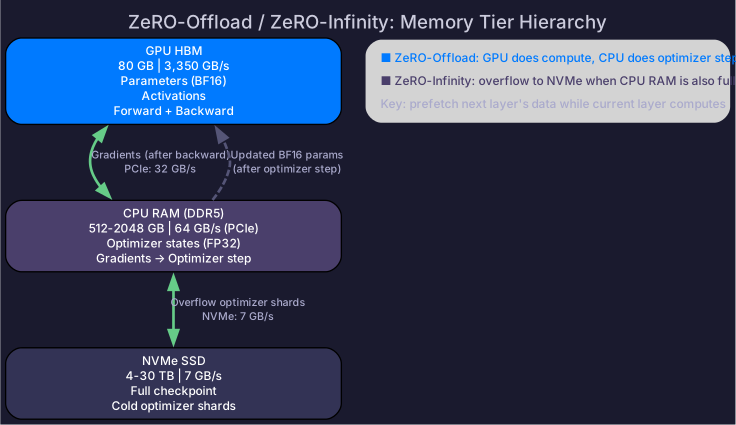
| Tier | Capacity | Bandwidth (to GPU) | Latency | Cost/GB |
|---|---|---|---|---|
| HBM (GPU) | 80-192 GB | 3,350 GB/s (internal) | ~ns | $$$$$ |
| CPU RAM (DDR5) | 512-2048 GB | 64 GB/s (PCIe 5.0) | ~μs | $$ |
| NVMe SSD | 4-30 TB | 7-14 GB/s (PCIe 4.0×4) | ~10 μs | $ |
Insight: CPU RAM is 8-32× larger than GPU memory, and NVMe is 100× larger. If we can hide the bandwidth gap with prefetching, we get access to vastly more memory.
2. ZeRO-Offload (CPU Offloading)
What Gets Offloaded
The optimizer step is the only phase that needs optimizer states. Offload them to CPU:
| Component | Location | When needed |
|---|---|---|
| BF16 parameters | GPU | Forward + backward |
| BF16 gradients | GPU → CPU (after backward) | Optimizer step (on CPU) |
| FP32 master weights | CPU | Optimizer step (on CPU) |
| FP32 Adam m, v | CPU | Optimizer step (on CPU) |
How It Works
Forward pass:   GPU (BF16 params on GPU)
Backward pass:  GPU (BF16 params + gradients on GPU)
                → Transfer gradients to CPU (PCIe)
Optimizer step: CPU (FP32 master weights + Adam states + gradients)
                → Compute Adam update on CPU
                → Transfer updated BF16 params back to GPU (PCIe)
Memory Savings
| Configuration | Per-GPU memory |
|---|---|
| Standard DP (7B) | 112 GB |
| ZeRO-3 (8 GPUs) | 14 GB |
| ZeRO-Offload (1 GPU) | 14 GB on GPU + 98 GB on CPU |
ZeRO-Offload enables single-GPU training of models that normally need 8 GPUs — at the cost of slower optimizer steps.
Bandwidth Analysis
For a 7B model:
- Gradients to CPU: 14 GB at 32 GB/s (PCIe 4.0 x16) = 0.44 seconds
- Updated params to GPU: 14 GB at 32 GB/s = 0.44 seconds
- CPU optimizer step: ~2-5 seconds (CPU is slow at FP32 math)
Total overhead: ~3-6 seconds per step. Backward pass on GPU takes ~0.3 seconds. Offloading adds 10-20× overhead to the optimizer step.
Optimization: Overlap Transfer with Compute
Layer L backward (GPU) → Transfer layer L grads to CPU (PCIe)
Layer L-1 backward (GPU) → Transfer layer L-1 grads to CPU
...
While GPU does backward, CPU starts optimizer step on received layers
With proper overlap, the CPU optimizer step can be partially hidden behind backward compute.
3. ZeRO-Infinity (NVMe Offloading)
When even CPU RAM isn’t enough (models >100B on limited hardware):
| Component | Location |
|---|---|
| Parameters (sharded) | NVMe → CPU → GPU (prefetched) |
| Optimizer states | NVMe → CPU (for optimizer step) |
| Gradients | GPU → CPU → NVMe (offloaded after use) |
NVMe Bandwidth Challenge
NVMe SSDs: ~7 GB/s read. For a 70B model (1,120 GB training state):
- Full read from NVMe: 1,120 / 7 = 160 seconds — obviously too slow for per-step reads
Solution: Only prefetch the current layer’s data, and overlap with compute:
- One layer of 70B: ~14 GB params + gradients
- Prefetch time: 14 / 7 = 2 seconds (still slow, but overlappable)
When NVMe Offloading Makes Sense
| Scenario | Feasible? | Notes |
|---|---|---|
| Fine-tuning 70B on 1-2 GPUs | ⚠️ Very slow | Works but 50-100× slower than 8×H100 |
| Research/experimentation | ✅ | Cost-effective for debugging, small runs |
| Production training | ❌ | Too slow for large-scale training |
4. DeepSpeed Configuration
# ZeRO-Offload (CPU)
ds_config = {
    "zero_optimization": {
        "stage": 3,
        "offload_optimizer": {
            "device": "cpu",
            "pin_memory": True,       # faster CPU↔GPU transfer
        },
        "offload_param": {
            "device": "cpu",
            "pin_memory": True,
        },
    }
}

# ZeRO-Infinity (NVMe)
ds_config = {
    "zero_optimization": {
        "stage": 3,
        "offload_optimizer": {
            "device": "nvme",
            "nvme_path": "/local_nvme/offload",
            "buffer_count": 4,          # double-buffer for overlap
            "buffer_size": 1e9,
        },
        "offload_param": {
            "device": "nvme",
            "nvme_path": "/local_nvme/offload",
            "buffer_count": 5,
            "buffer_size": 1e8,
            "max_in_cpu": 1e9,          # keep some params in CPU for faster access
        },
    }
}
Pin memory (
pin_memory=True): Uses page-locked (pinned) host memory for CPU↔GPU transfers. Pinned memory bypasses the OS page table, enabling DMA transfers at full PCIe bandwidth. Standard (pageable) memory requires an extra copy.
5. Decision Framework
| Available resources | Recommended approach |
|---|---|
| 8+ GPUs with enough aggregate memory | ZeRO-1/2 (no offloading needed) |
| 1-4 GPUs, model fits with ZeRO-3 | ZeRO-3 (keep everything on GPU) |
| 1-2 GPUs, model doesn’t fit with ZeRO-3 | ZeRO-Offload (CPU) |
| 1 GPU, very large model, fine-tuning only | ZeRO-Infinity (NVMe) |
| Production pre-training at scale | Never use offloading — get more GPUs |
For training launch mechanics and process management, see Distributed Launch Mechanics.
Self-Check
- Compare the three memory tiers (HBM, CPU RAM, NVMe) by capacity, bandwidth, and latency
- Explain ZeRO-Offload’s data flow: what stays on GPU vs what moves to CPU
- Calculate the PCIe transfer overhead for offloading a 7B model’s gradients
- Explain why NVMe offloading is only practical for fine-tuning, not pre-training
- Configure DeepSpeed for CPU offloading with pinned memory