CUDA Streams, Events & Graphs
Asynchronous execution, overlapping compute and data transfer, reducing launch overhead with CUDA Graphs, and persistent kernels.
CUDA operations are asynchronous by default — the CPU doesn’t wait for the GPU to finish. Streams, events, and graphs give you fine-grained control over execution order, enabling overlapped data transfer + compute and reduced kernel launch overhead.
1. Asynchronous Execution
When the CPU launches a kernel or memory copy, it returns immediately:
kernel<<<grid, block>>>(args);  // CPU returns immediately
// GPU is still executing kernel...
cudaDeviceSynchronize();         // CPU blocks until GPU finishes
Without synchronization, the CPU can do useful work (prepare next batch, launch more kernels) while the GPU computes.
2. Streams: Ordered Queues
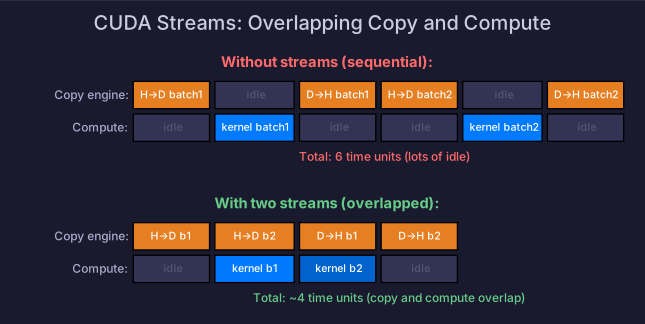
A stream is a sequence of operations that execute in order. Operations in different streams can overlap.
cudaStream_t stream1, stream2;
cudaStreamCreate(&stream1);
cudaStreamCreate(&stream2);

// These two can overlap:
cudaMemcpyAsync(d_A, h_A, size, cudaMemcpyHostToDevice, stream1);
kernel<<<grid, block, 0, stream2>>>(d_B, d_C);  // compute on different data

cudaStreamSynchronize(stream1);  // wait for stream1 only
cudaStreamDestroy(stream1);
cudaStreamDestroy(stream2);
Default Stream
Operations without an explicit stream use the default stream (stream 0), which synchronizes with all other streams on the device. This is why naive CUDA code serializes everything.
Overlapping Copy and Compute
The most common use: overlap data transfer with computation by double-buffering:
for (int i = 0; i < numBatches; i++) {
    int curr = i % 2;
    int next = (i + 1) % 2;

    // Transfer next batch while computing current
    if (i + 1 < numBatches) {
        cudaMemcpyAsync(d_input[next], h_input[i+1], size,
                        cudaMemcpyHostToDevice, transferStream);
    }

    // Compute on current batch
    kernel<<<grid, block, 0, computeStream>>>(d_input[curr], d_output[curr]);

    // Transfer results back
    cudaMemcpyAsync(h_output[i], d_output[curr], size,
                    cudaMemcpyDeviceToHost, transferStream);
}Requirement: Host memory must be pinned (page-locked) for async transfers:
cudaMallocHost(&h_data, size);  // pinned memory
// or
cudaHostAlloc(&h_data, size, cudaHostAllocDefault);
Multi-GPU Streams
Each GPU has its own set of streams. Use cudaSetDevice to switch context:
cudaSetDevice(0);
cudaStream_t stream0;
cudaStreamCreate(&stream0);
kernel<<<grid, block, 0, stream0>>>(d_data_gpu0);

cudaSetDevice(1);
cudaStream_t stream1;
cudaStreamCreate(&stream1);
kernel<<<grid, block, 0, stream1>>>(d_data_gpu1);
Operations on different GPUs are naturally concurrent — no synchronization needed unless you transfer data between them.
3. Events: Timing and Synchronization
Events are GPU-side markers for timing and inter-stream synchronization.
Timing with Events
cudaEvent_t start, stop;
cudaEventCreate(&start);
cudaEventCreate(&stop);

cudaEventRecord(start, stream);
kernel<<<grid, block, 0, stream>>>(args);
cudaEventRecord(stop, stream);

cudaEventSynchronize(stop);
float ms;
cudaEventElapsedTime(&ms, start, stop);
printf("Kernel took %.3f ms\n", ms);
Always use events for GPU timing — not CPU timers. CPU timers measure launch overhead, not GPU execution time.
Inter-Stream Synchronization
Make one stream wait for an event in another stream:
cudaEventRecord(event, stream1);
cudaStreamWaitEvent(stream2, event);  // stream2 waits until stream1 reaches event
4. CUDA Graphs: Reducing Launch Overhead
Each kernel launch has ~5-10 μs overhead (CPU→driver→GPU). For workloads with many small kernels (like Transformer inference with dozens of ops per layer), launch overhead can dominate.
The Problem
Layer 1: norm → attn_qkv → attn_score → softmax → attn_out → norm → ffn_gate → ffn_up → ffn_down
Layer 2: norm → attn_qkv → ...
Each launch: ~5μs. 32 layers × ~9 ops = 288 launches × 5μs = 1.4ms just in launch overhead
The Solution: CUDA Graphs
Capture a sequence of operations into a graph, then replay it as a single launch:
// Step 1: Capture the graph
cudaGraph_t graph;
cudaStreamBeginCapture(stream, cudaStreamCaptureModeGlobal);

// All operations here are recorded, not executed
for (int layer = 0; layer < numLayers; layer++) {
    layerNorm<<<g, b, 0, stream>>>(args);
    attention<<<g, b, 0, stream>>>(args);
    ffn<<<g, b, 0, stream>>>(args);
}

cudaStreamEndCapture(stream, &graph);

// Step 2: Instantiate (compile the graph)
cudaGraphExec_t graphExec;
cudaGraphInstantiate(&graphExec, graph, nullptr, nullptr, 0);

// Step 3: Launch (one launch for the entire graph!)
cudaGraphLaunch(graphExec, stream);
Benefits
- One launch replaces hundreds of individual launches
- GPU can optimize the entire graph (overlap independent operations)
- Typical speedup: 10-30% for inference workloads with many small kernels
Limitations
- Graph is static — if shapes change (dynamic batching), you need to recapture
- Not all operations are graph-compatible (some allocations, host functions)
torch.compilein PyTorch uses CUDA Graphs under the hood
5. Persistent Kernels
Instead of launching a kernel per operation, keep a single kernel running and feed it work through a queue:
__global__ void persistentKernel(WorkQueue* queue) {
    while (true) {
        WorkItem item = queue->dequeue();  // wait for new work
        if (item.type == DONE) break;

        switch (item.type) {
            case MATMUL: doMatmul(item); break;
            case SOFTMAX: doSoftmax(item); break;
        }
    }
}Benefits: Zero launch overhead — the kernel is already running. Used in advanced serving engines (TensorRT-LLM).
Drawbacks: Complex programming model, harder to debug, occupies GPU resources even when idle.
6. PyTorch Integration
Streams in PyTorch
s = torch.cuda.Stream()
with torch.cuda.stream(s):
    # Operations here run on stream s
    output = model(input)

torch.cuda.current_stream().wait_stream(s)  # synchronize
CUDA Graphs in PyTorch
# Warmup (required for graph capture)
for _ in range(3):
    output = model(static_input)

# Capture
g = torch.cuda.CUDAGraph()
with torch.cuda.graph(g):
    static_output = model(static_input)

# Replay (much faster than re-running)
g.replay()
# static_output now contains the result
torch.compilewithmode="reduce-overhead"automatically uses CUDA Graphs where possible.
Self-Check
- Explain why CUDA operations are asynchronous and when to synchronize
- Implement overlapped copy + compute using two streams
- Explain why pinned memory is required for async transfers
- Use CUDA events for accurate GPU timing
- Explain CUDA Graph capture-instantiate-launch workflow
- Explain when CUDA Graphs help and when they don’t (dynamic shapes)
- Explain persistent kernels and their tradeoffs