Debugging Distributed Hangs
NCCL environment variables, flight recorder, torch.distributed diagnostics, nccl-tests — the systematic approach to finding why your training job froze.
Distributed training hangs are the most frustrating bugs in AI infrastructure — the job freezes silently, all GPUs show 0% utilization, and there’s no error message. This chapter gives you a systematic debugging workflow.
1. Why Distributed Jobs Hang
| Cause | Symptom | Frequency |
|---|---|---|
| Rank mismatch | One rank calls AllReduce, another doesn’t | Very common (code bug) |
| Network failure | NIC or switch drops connection | Common (hardware) |
| NCCL timeout | One GPU is slower, others wait | Common (straggler) |
| Deadlock | Ranks call collectives in different order | Occasional (logic bug) |
| OOM on one rank | Rank crashes, others hang waiting | Common |
| Firewall/port blocking | Ranks can’t establish NCCL connections | Setup issue |
2. Step-by-Step Debugging Workflow
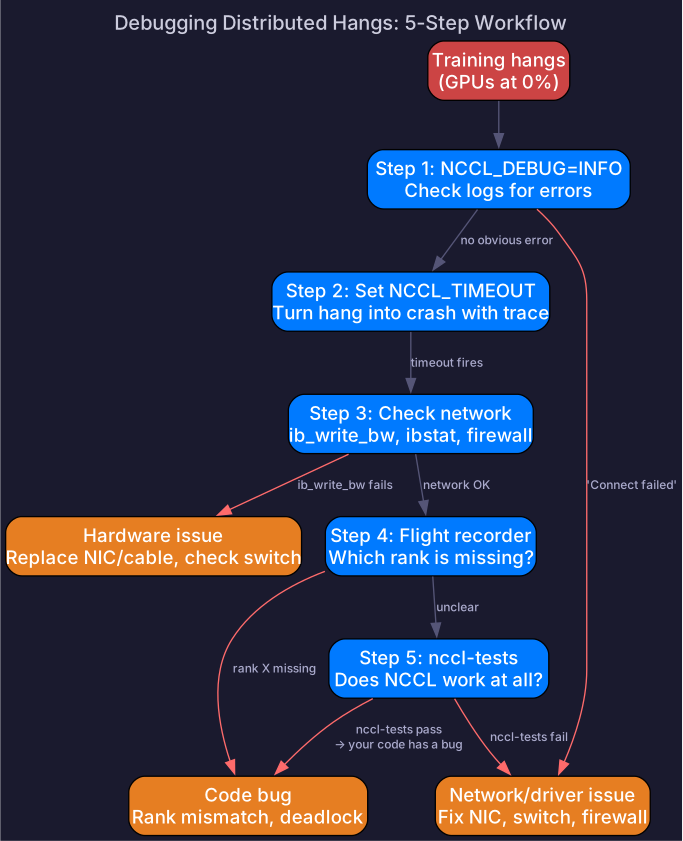
Step 1: Enable NCCL Debug Logging
export NCCL_DEBUG=INFO          # basic info (topology, algorithm selection)
export NCCL_DEBUG=WARN          # warnings only (less noise)
export NCCL_DEBUG_SUBSYS=ALL    # all subsystems
export NCCL_DEBUG_FILE=/tmp/nccl_%h_%p.log  # per-host, per-process logs
Run and check logs for errors:
grep -i "error\|fail\|timeout\|warn" /tmp/nccl_*.logStep 2: Set Timeouts
# NCCL timeout (seconds) — kill if collective doesn't complete
export NCCL_TIMEOUT=300  # 5 minutes (default is infinite!)

# PyTorch distributed timeout
export TORCH_DISTRIBUTED_TIMEOUT=300
# In code
dist.init_process_group('nccl', timeout=timedelta(seconds=300))Without timeouts, a hang lasts forever. Always set them.
Step 3: Check Network Connectivity
# Can all nodes reach each other?
# On each node, test RDMA to every other node:
ib_write_bw <other_node_ip>

# Check IB device status
ibstat

# Check for link errors
perfquery  # IB performance counters
Step 4: Use NCCL Flight Recorder (PyTorch 2.1+)
Flight recorder captures the last N collective operations — even if the job hangs:
import torch.distributed as dist

# Enable flight recorder
dist.init_process_group('nccl')
torch._C._distributed_c10d._set_work_timeout(timedelta(seconds=300))

# If hang occurs, dump state:
torch.distributed.breakpoint()  # or send SIGUSR1
# Or use environment variable
export TORCH_NCCL_TRACE_BUFFER_SIZE=100 # keep last 100 ops
export TORCH_NCCL_DUMP_ON_TIMEOUT=1 # auto-dump on timeoutThe dump shows: which collective was in progress, which ranks had entered it, and which ranks were missing — directly identifying the stuck rank.
Step 5: Isolate with nccl-tests
Before debugging your training code, verify NCCL works at all:
# Build nccl-tests
git clone https://github.com/NVIDIA/nccl-tests
cd nccl-tests && make MPI=1

# Test AllReduce across all GPUs
mpirun -np 16 --hostfile hosts \
  ./build/all_reduce_perf -b 1M -e 1G -f 2 -g 1

# Expected output:
#   size     time    algbw   busbw
#   1048576  0.08    12.43   23.30    ← should show reasonable bandwidth
If nccl-tests fail → network/driver issue (not your code). If nccl-tests pass → your code has a rank mismatch or deadlock.
Async Error Handling
By default, NCCL errors on one rank don’t propagate to other ranks — they just hang. Enable async error handling to turn NCCL errors into Python exceptions:
import torch.distributed as dist

dist.init_process_group('nccl')

# Enable async error handling — NCCL errors become exceptions
torch.distributed.DistBackend.NCCL.set_timeout(timedelta(seconds=300))
# Or via environment variable
export TORCH_NCCL_ASYNC_ERROR_HANDLING=1With this enabled, if rank 3 crashes, other ranks get a RuntimeError instead of hanging forever.
3. Common Issues and Fixes
Issue: “NCCL WARN Cuda failure”
NCCL WARN Cuda failure 'out of memory'One rank OOM’d. Fix: reduce batch size, enable gradient checkpointing, or use ZeRO.
Issue: “NCCL WARN Connect timeout”
NCCL WARN Connect to rank X failedNetwork connectivity issue. Check:
- Firewall rules (NCCL uses TCP for setup, RDMA for data)
- Port range:
export NCCL_SOCKET_IFNAME=eth0and ensure ports 29400-29500 are open - IB device status:
ibstat
Issue: Training freezes at exactly the same step
Likely a rank mismatch — one rank takes a code path that skips a collective:
# BUG: only rank 0 calls all_reduce
if rank == 0:
    dist.all_reduce(tensor)  # other ranks skip this → hang

# FIX: all ranks must call the same collectives
dist.all_reduce(tensor)  # always, unconditionally
Issue: Slow AllReduce (but not hanging)
# Profile NCCL
export NCCL_DEBUG=INFO
# Check for: "Using GPUDirect RDMA" → if missing, falling back to CPU-staged transfer
# Check for: unexpected algorithm (tree for large messages)

# Benchmark
./nccl-tests/build/all_reduce_perf -b 1G -e 1G -f 2 -g 8
# Compare to theoretical: 2N/B = 2GB / 450GB/s = 4.4ms (NVLink)
4. Prevention: Best Practices
| Practice | Why |
|---|---|
Always set NCCL_TIMEOUT | Hangs become crashes with stack traces (debuggable) |
Use NCCL_DEBUG=WARN in production | Catches issues without log overhead |
| Run nccl-tests before training | Verifies network works before wasting GPU hours |
| Barrier after init | dist.barrier() catches connectivity issues early |
| Log rank on every print | print(f"[Rank {rank}] ...") for correlating logs |
Use torchrun (not manual spawn) | Handles rank assignment, elastic restart, error propagation |
# Good template for distributed training
import torch.distributed as dist
import os

dist.init_process_group('nccl', timeout=timedelta(seconds=300))
rank = dist.get_rank()
world_size = dist.get_world_size()
local_rank = int(os.environ['LOCAL_RANK'])
torch.cuda.set_device(local_rank)

# Verify connectivity
dist.barrier()
if rank == 0:
    print(f"All {world_size} ranks connected successfully")
Self-Check
- Name 5 common causes of distributed training hangs
- Set
NCCL_DEBUG,NCCL_TIMEOUT, and flight recorder environment variables - Use nccl-tests to verify AllReduce bandwidth before training
- Diagnose a rank mismatch bug from flight recorder output
- Debug a “Connect timeout” error (network, firewall, device)
- Write a distributed init template with proper timeout and barrier