Reading Cluster Topology Diagrams
How to look at a cluster's hardware topology and determine which parallelism strategies it can support — a practical skill for AI infrastructure.
Given a cluster’s hardware spec, you should be able to determine: what’s the maximum TP degree, which GPUs should form a PP group, and where DP communication will be the bottleneck. This chapter teaches you to read a topology and make these decisions.
1. The Information You Need
| Information | Where to find it | Why it matters |
|---|---|---|
| GPUs per node | Spec sheet, nvidia-smi | Max TP degree (usually = GPUs per node) |
| NVLink connectivity | nvidia-smi topo -m | Which GPUs can do TP together |
| NICs per node | ibstat, ip link | Aggregate inter-node bandwidth |
| Network topology | Vendor docs, ibnetdiscover | Oversubscription, leaf groups |
| Total GPUs | Cluster config | Total parallelism budget |
2. Example: DGX H100 Cluster (32 nodes, 256 GPUs)
Step 1: Identify Intra-Node Resources
$ nvidia-smi topo -m
        GPU0  GPU1  GPU2  GPU3  GPU4  GPU5  GPU6  GPU7
GPU0     X    NV18  NV18  NV18  NV18  NV18  NV18  NV18
GPU1    NV18   X    NV18  NV18  NV18  NV18  NV18  NV18
...
NV18 = NVLink 4.0 (18 links). All 8 GPUs fully connected → TP up to 8 is feasible.
Step 2: Identify Inter-Node Bandwidth
$ ibstat | grep "Rate"
Rate: 400  # NDR InfiniBand, 400 Gb/s = 50 GB/s per port
8 NICs per node → 400 GB/s aggregate inter-node.
Step 3: Determine Parallelism
For a 70B model on this cluster:
Memory check:
  70B × 2 bytes (BF16) = 140 GB → doesn't fit on 1 GPU (80 GB)
  With TP=8: 140/8 = 17.5 GB per GPU → fits ✅
  With TP=4: 140/4 = 35 GB per GPU → fits ✅

TP degree: 8 (use all NVLink within a node)
PP degree: 1 (70B fits in one node with TP=8)
DP degree: 32 (all 32 nodes)
Total: TP=8 × DP=32 = 256 GPUs ✅
For a 405B model:
Memory check:
  405B × 2 = 810 GB → TP=8 gives 101 GB per GPU → doesn't fit (80 GB)
  Need PP: TP=8 × PP=2 → 810/16 = 50.6 GB per GPU → fits ✅

TP=8 (intra-node), PP=2 (across 2 nodes), DP=16 (remaining 16 node pairs)
Total: TP=8 × PP=2 × DP=16 = 256 GPUs ✅
Step 4: Verify Communication Isn’t the Bottleneck
DP AllReduce: 810 GB × 2 / 400 GB/s = ~4 seconds (too slow!)
With gradient bucketing + overlap: ~500 ms exposed → check if backward > 500 ms
If backward takes 2 seconds → overlap hides most of AllReduce → acceptable.
3. Example: Cloud Instance (8× A100, PCIe)
$ nvidia-smi topo -m
        GPU0  GPU1  GPU2  GPU3  GPU4  GPU5  GPU6  GPU7
GPU0     X    NV12  NV12  NV12  SYS   SYS   SYS   SYS
GPU4    SYS   SYS   SYS   SYS    X    NV12  NV12  NV12
NV12 between GPUs 0-3 and NV12 between GPUs 4-7, but SYS (cross-socket) between the two groups. This is a dual-socket system.
Implication: TP=4 (within a NVLink group) is efficient. TP=8 would require cross-socket traffic (~25 GB/s instead of 600 GB/s) — 4× slower. Use TP=4 + DP=2 within the node, or TP=4 + PP=2.
4. Quick Decision Framework
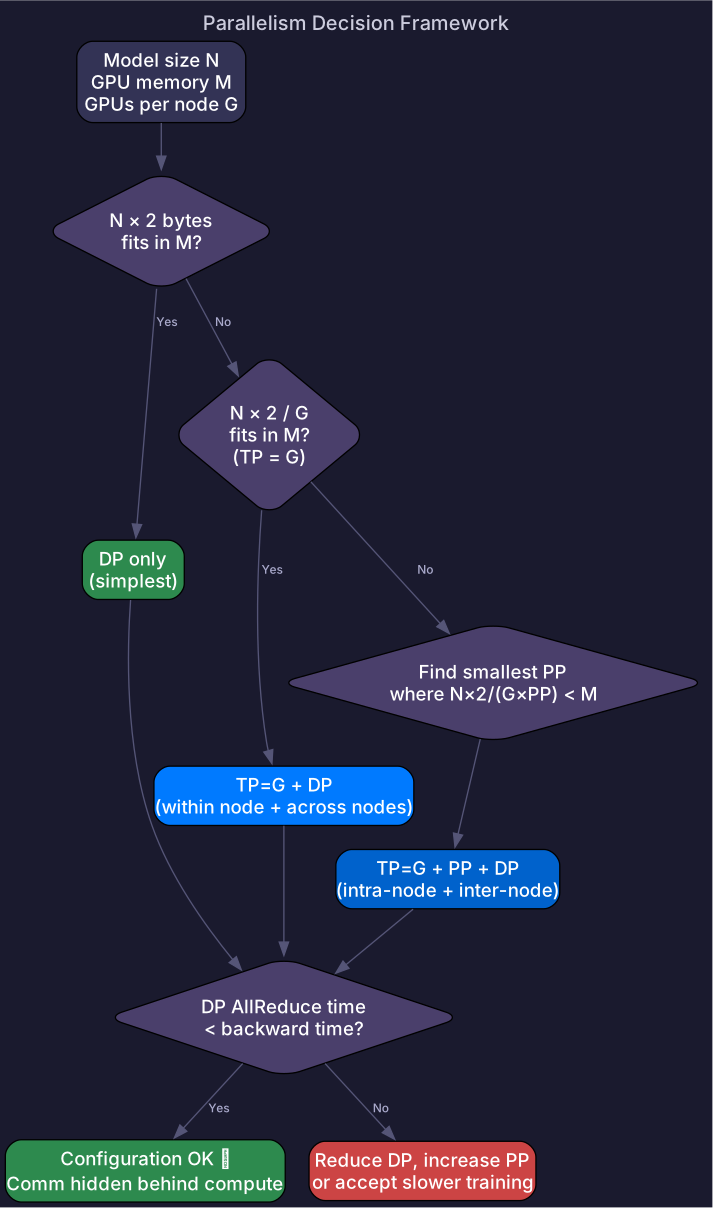
Given: model size N, GPU memory M, GPUs per node G, total GPUs P

1. Does N × 2 bytes fit in M?
   Yes → DP only (simplest)
   No →

2. Does N × 2 / G fit in M?  (TP = G)
   Yes → TP=G within node, DP for remaining GPUs
   No →

3. Need PP: find smallest PP such that N × 2 / (G × PP) < M
   Set TP=G, PP=PP, DP = P / (G × PP)

4. Check: DP AllReduce time < backward time?
   Yes → communication hidden ✅
   No → reduce DP degree, increase PP, or accept slower training
For quantitative parallelism planning with worked examples, see the next section: Parallelism Planning.
Self-Check
- Read
nvidia-smi topo -moutput and identify NVLink groups - Determine max TP degree for a given node topology
- Calculate memory per GPU for TP×PP configuration
- Identify cross-socket connections that would slow TP
- Apply the quick decision framework to size TP/PP/DP for a given model and cluster