NVLink & NVSwitch
NVIDIA's intra-node GPU interconnect — generations, bandwidth, full-bisection topology, and why NVLink determines parallelism strategy.
NVLink is the high-bandwidth interconnect between GPUs within a single server node. Its bandwidth — 10-36× higher than InfiniBand — determines which parallelism strategies are feasible and where communication bottlenecks appear.
1. NVLink Generations
| Generation | Year | GPUs | BW per link | Links per GPU | Total BW per GPU | Notable |
|---|---|---|---|---|---|---|
| NVLink 2.0 | 2017 | V100 | 25 GB/s | 6 | 300 GB/s | First AI NVLink |
| NVLink 3.0 | 2020 | A100 | 25 GB/s | 12 | 600 GB/s | 2× links |
| NVLink 4.0 | 2022 | H100 | 25 GB/s | 18 | 900 GB/s (bidirectional) | NVSwitch full mesh |
| NVLink 5.0 | 2024 | B200 | 50 GB/s | 18 | 1,800 GB/s | 2× per link |
Bandwidth doubles every generation — either through more links or higher per-link speed.
2. NVSwitch: Full-Bisection Topology
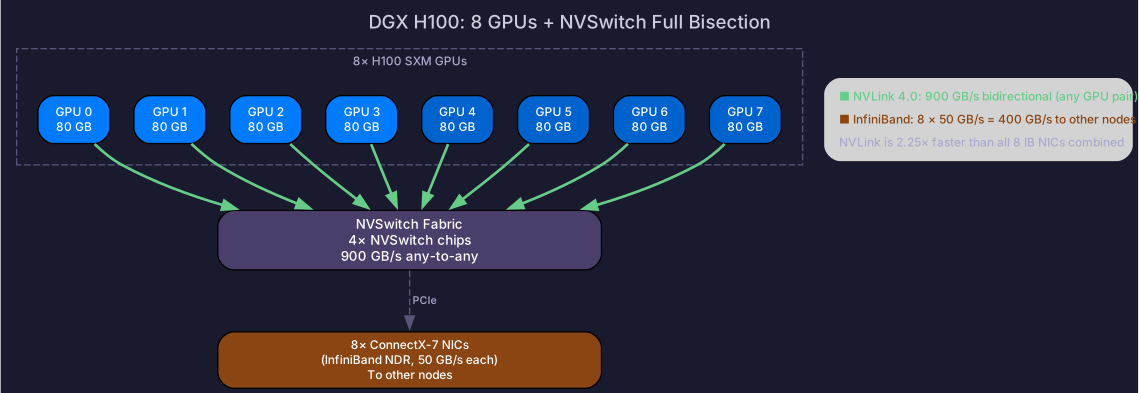
Without NVSwitch, GPUs connect peer-to-peer via NVLink — forming a partial mesh. GPU 0 can talk to GPU 1 directly, but reaching GPU 7 may require hopping through intermediate GPUs.
NVSwitch creates a full-bisection fabric: every GPU can communicate with every other GPU at full bandwidth simultaneously.
Without NVSwitch (partial mesh):
  GPU0 ═══ GPU1 ═══ GPU2 ═══ GPU3
   ║                          ║
  GPU4 ═══ GPU5 ═══ GPU6 ═══ GPU7
  (reaching GPU7 from GPU0 may require hops)

With NVSwitch (full bisection):
  GPU0 ──┐
  GPU1 ──┤
  GPU2 ──┼── NVSwitch fabric ──┼── any-to-any at full BW
  GPU3 ──┤                     │
  GPU4 ──┤                     │
  GPU5 ──┤                     │
  GPU6 ──┤                     │
  GPU7 ──┘                     │
DGX H100: 4 NVSwitch chips connecting 8 H100 GPUs. Any GPU pair gets 900 GB/s bidirectional — same as directly connected.
NVLink vs PCIe
| NVLink 4.0 | PCIe 5.0 | |
|---|---|---|
| Bandwidth (bidirectional) | 900 GB/s | 128 GB/s |
| Ratio | 7× faster | Baseline |
| Latency | ~5 μs | ~10 μs |
| Used for | TP, EP (high-frequency comm) | CPU↔GPU, NIC↔GPU |
PCIe is used for: CPU communication, NIC access (GPUDirect RDMA goes GPU→PCIe→NIC). NVLink is exclusively GPU↔GPU — it doesn’t connect to CPUs or NICs.
Some cloud instances (e.g., p4d.24xlarge) have GPUs connected only via PCIe (no NVLink). On these, TP=8 works but at ~7× lower inter-GPU bandwidth — significantly slower for TP-heavy workloads.
3. GB200 NVL72: Rack-Scale NVLink
Blackwell extends NVLink beyond a single node with NVLink Switch:
- 72 GPUs connected via NVLink across multiple trays in a single rack
- 1.8 TB/s per GPU bidirectional
- All 72 GPUs in one NVLink domain — any-to-any at full bandwidth
This changes the calculus: tensor parallelism across 72 GPUs (was limited to 8) becomes feasible. A single 72-GPU system can handle models that previously needed multi-node PP.
For interconnect comparison tables (NVLink vs PCIe vs IB), see GPU Memory & Interconnects.
4. Impact on Parallelism
NVLink bandwidth determines what runs intra-node:
| Strategy | Comm per step | NVLink (900 GB/s) | InfiniBand (50 GB/s) | Placement |
|---|---|---|---|---|
| Tensor Parallel | AllReduce per layer | ~0.1 ms | ~2 ms (20× slower) | Intra-node only |
| Data Parallel | AllReduce per step | ~55 ms | ~560 ms | Can be inter-node |
| Pipeline Parallel | P2P per micro-batch | ~0.1 ms | ~1 ms | Can be inter-node |
| Expert Parallel | All-to-All per layer | ~0.3 ms | ~5 ms | NVLink preferred |
Rule: Put the highest-communication strategies on the highest-bandwidth interconnect. TP on NVLink, DP and PP on InfiniBand.
5. Checking Your NVLink Topology
# Show GPU topology
nvidia-smi topo -m

# Output legend:
#   NV# = connected via NVLink (# = generation)
#   PIX = same PCIe switch
#   SYS = cross-socket (through CPU)

# Show NVLink status
nvidia-smi nvlink -s

# Show NVLink bandwidth per link
nvidia-smi nvlink -c
Self-Check
- Name the NVLink bandwidth for each GPU generation (V100 → B200)
- Explain NVSwitch and why full-bisection matters for AllReduce
- Explain GB200 NVL72 and how it changes the TP degree limit
- Explain why TP must stay intra-node based on NVLink vs IB bandwidth
- Use
nvidia-smi topo -mto check GPU interconnect topology