GPU Memory & Interconnects
Where training memory goes, optimization strategies (ZeRO, checkpointing, offloading), and multi-GPU interconnect topologies.
Two questions dominate AI infrastructure engineering: “why doesn’t my model fit in memory?” and “how do I connect enough GPUs?” This chapter answers both.
1. Where Training Memory Goes
When training large models, memory is often the first bottleneck. A 7B-parameter model in FP16 requires ~14 GB just for parameters — but that’s the smallest piece.
With Adam optimizer + FP16 mixed precision, memory per parameter:
| Component | Bytes/param | Notes |
|---|---|---|
| FP16 parameters | 2 B | Used in forward/backward |
| FP32 parameter copy | 4 B | Adam needs FP32 master weights |
| FP32 gradients | 4 B | Produced by backward pass |
| Adam first moment (m) | 4 B | Exponential moving average of gradients |
| Adam second moment (v) | 4 B | Exponential moving average of squared gradients |
| Total | 18 B | — |
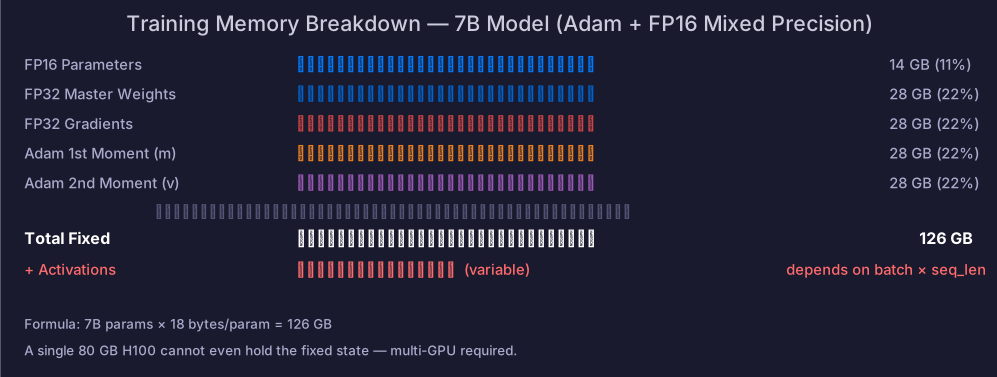
A 7B model’s fixed memory = GB — before activations.
A single 80 GB H100 cannot even hold the fixed state. Activations add more on top, scaling with batch size and sequence length. This is why multi-GPU training and memory optimization are not optional — they are the baseline.
2. Memory Optimization Strategies
| Strategy | Principle | Memory Savings | Cost |
|---|---|---|---|
| Mixed precision | FP16/BF16 for forward/backward, FP32 for updates | ~50% parameter memory | Loss scaling needed (FP16) |
| Gradient accumulation | Accumulate gradients across micro-batches | Reduces peak activation memory | More training steps |
| Activation checkpointing | Save only some activations, recompute during backward | Activation memory drops to | ~33% more compute |
| ZeRO Stage 1 | Shard optimizer states across GPUs | ~4× reduction in optimizer memory | More communication |
| ZeRO Stage 2 | + shard gradients | Further reduction | More communication |
| ZeRO Stage 3 | + shard parameters | Linear reduction with GPU count | Significant communication |
| CPU offloading | Move optimizer states to CPU RAM | Break single-GPU limit | PCIe bandwidth bottleneck |
| NVMe offloading | Move to SSD | Break CPU RAM limit | Much slower |
These strategies are not mutually exclusive. A typical production configuration:
DeepSpeed ZeRO Stage 2 + BF16 mixed precision + activation checkpointing — standard for training 7B–70B models.
How ZeRO Reduces Memory
Without ZeRO, each GPU holds a full copy of everything (18 bytes/param). With ZeRO-3 across N GPUs, each GPU holds only of parameters, gradients, and optimizer states — but must communicate to reconstruct full tensors during forward/backward.
The tradeoff: memory scales linearly down with GPU count, communication scales up.
3. Multi-GPU Interconnects
When a single GPU’s memory and compute are insufficient, multi-GPU parallelism is needed. The interconnect bandwidth and topology directly determine efficiency.
Interconnect Technologies
| Technology | Bandwidth | Scope | Notes |
|---|---|---|---|
| PCIe 5.0 | 128 GB/s (bidirectional) | Cross-GPU (general) | Universal but low bandwidth |
| NVLink 4.0 (Hopper) | 900 GB/s (bidirectional total) | Intra-node GPU↔GPU | 18 links × 25 GB/s × 2 |
| NVLink 5.0 (Blackwell) | 1,800 GB/s (bidirectional total) | Intra-node GPU↔GPU | B200 |
| NVSwitch | Full-bisection NVLink fabric | Intra-node all-to-all | Any GPU to any GPU at full BW |
| InfiniBand NDR | 400 Gb/s (50 GB/s) per port | Inter-node | Large cluster standard |
DGX H100 Topology
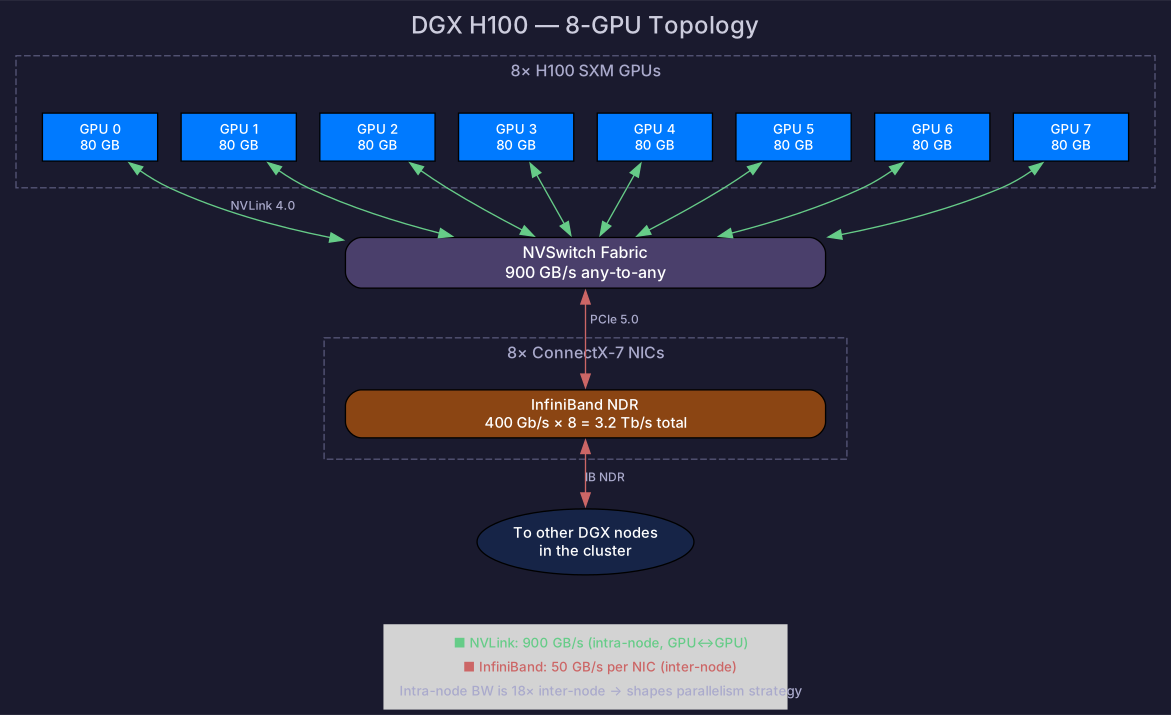
A DGX H100 (8 GPUs):
- 8× H100 fully connected via NVSwitch — 900 GB/s between any two GPUs
- 8× ConnectX-7 InfiniBand NICs for cluster connectivity
- Intra-node: 900 GB/s vs inter-node: 50 GB/s per NIC — an 18× bandwidth gap
This gap directly shapes parallelism strategy:
| Parallelism type | Communication volume | Best interconnect |
|---|---|---|
| Tensor parallelism | Very high (every layer) | NVLink (intra-node) |
| Data parallelism | Medium (gradient sync) | InfiniBand (inter-node OK) |
| Pipeline parallelism | Low (activation boundaries) | InfiniBand (inter-node OK) |
| Expert parallelism (MoE) | High (All-to-All) | NVLink preferred |
Rule of thumb: Put high-communication parallelism dimensions on NVLink. Put lower-communication dimensions on InfiniBand.
# View GPU topology
nvidia-smi topo -m

# View NVLink status
nvidia-smi nvlink -s
Self-Check
- Calculate memory for a 7B model with Adam + FP16 mixed precision
- Explain ZeRO Stage 1/2/3 and the tradeoff between memory and communication
- List 3+ memory optimization strategies and their costs
- Know the bandwidth difference between NVLink and InfiniBand
- Explain why tensor parallelism should be intra-node and data parallelism can be inter-node
- Use
nvidia-smi topo -mto check GPU connectivity