Programming Essentials for AI Infrastructure
Python internals, C/C++ for extensions, Linux basics, GPU software stack, and the development tools needed before writing your first kernel.
AI infrastructure code spans three languages: Python for training scripts and orchestration, C/C++ for performance-critical kernels and CUDA code, and Bash for cluster management. This chapter is not a language tutorial — it’s a focused checklist of what you need to know and what catches people.
1. The Three-Layer Stack
| Layer | Language | Role in AI Infra | Example |
|---|---|---|---|
| Orchestration | Python | Training loops, data loading, experiment management | torch.distributed.launch, DeepSpeed config |
| Compute kernels | C/C++ + CUDA | Matrix operations, attention kernels, custom ops | FlashAttention, Triton kernels, NCCL |
| System | Bash + Linux tools | Job scheduling, monitoring, debugging | Slurm scripts, nvidia-smi, nccl-tests |
You don’t need to be an expert in all three, but you must be functional. Most AI infra engineers spend 70% in Python, 20% reading C++/CUDA, and 10% in Bash.
2. Python: What Catches You
Objects, References, and Mutability
Python variables are names pointing to objects, not boxes holding values:
a = [1, 2, 3]
b = a          # b points to the SAME list
b.append(4)
print(a)       # [1, 2, 3, 4] — surprise!
This matters for AI infra when sharing tensors, config dicts, or model parameters across processes.
Mutable defaults are a classic trap:
# BUG: all calls share the same list
def add_item(item, items=[]):
    items.append(item)
    return items

# FIX: use None sentinel
def add_item(item, items=None):
    if items is None:
        items = []
    items.append(item)
    return items
Generators: Process Data Without Loading It All
# Bad: loads entire dataset into memory
tokens = [tokenize(line) for line in open("data.txt")]

# Good: processes one line at a time
def token_stream(path):
    for line in open(path):
        yield tokenize(line)
Training data pipelines use generators extensively — you can’t fit a terabyte dataset in memory.
GIL and Concurrency
Python’s Global Interpreter Lock (GIL) means only one thread runs Python code at a time. This matters for:
| Concurrency model | When to use in AI infra |
|---|---|
| Threading | I/O-bound: downloading data, HTTP serving, monitoring |
| Multiprocessing | CPU-bound: data preprocessing, tokenization |
| asyncio | High-concurrency I/O: API gateways, model routers |
| torch.multiprocessing | GPU training: DataLoader workers, distributed training |
PyTorch DataLoader with
num_workers > 0uses multiprocessing to bypass the GIL for data loading. Each worker is a separate process with its own Python interpreter.
3. C/C++ for AI Infrastructure
You won’t write C++ daily, but you’ll read it. The key things to recognize:
Memory Management
// Stack allocation (automatic cleanup)
float buffer[1024];

// Heap allocation (manual cleanup)
float* data = new float[n];
// ... use data ...
delete[] data;  // must not forget

// Modern C++ (automatic cleanup via RAII)
auto data = std::make_unique<float[]>(n);
CUDA memory is always heap-allocated: cudaMalloc, cudaFree. Memory leaks in GPU code are expensive — 80 GB of HBM is a finite resource.
Pointers and Memory Layout
// Contiguous array — GPU-friendly
float* matrix = new float[rows * cols];
float element = matrix[i * cols + j];  // row-major access

// Pointer to pointer — NOT contiguous, NOT GPU-friendly
float** matrix2d = new float*[rows];
Understanding memory layout is essential for reading CUDA kernel code. Row-major vs column-major determines coalesced memory access patterns.
pybind11: Connecting Python and C++
Most PyTorch custom ops use pybind11 to expose C++ code to Python:
#include <pybind11/pybind11.h>

float dot_product(const float* a, const float* b, int n) {
    float sum = 0;
    for (int i = 0; i < n; i++) sum += a[i] * b[i];
    return sum;
}

PYBIND11_MODULE(my_ops, m) {
    m.def("dot_product", &dot_product, "Dot product of two arrays");
}
4. Linux Essentials
Critical Commands for AI Infra
# GPU status and utilization
nvidia-smi
nvidia-smi dmon -s u          # continuous GPU utilization monitoring
nvidia-smi topo -m             # GPU interconnect topology

# Process and resource monitoring
htop                           # CPU and memory usage
watch -n 1 nvidia-smi          # refresh GPU status every second
ps aux | grep python           # find training processes
kill -9 <pid>                  # kill hung training job

# Disk and network
df -h                          # disk usage
du -sh /data/checkpoints/*     # checkpoint sizes
iftop                          # network bandwidth
nload                          # network load per interface

# Log analysis
tail -f train.log              # follow training output
grep "loss" train.log | tail   # find recent loss values
grep -r "NCCL" /var/log/       # debug distributed training
Environment Variables That Matter
# CUDA device selection
export CUDA_VISIBLE_DEVICES=0,1,2,3

# Distributed training
export MASTER_ADDR=10.0.0.1
export MASTER_PORT=29500
export WORLD_SIZE=8
export RANK=0
export LOCAL_RANK=0

# NCCL tuning
export NCCL_DEBUG=INFO         # debug distributed hangs
export NCCL_IB_DISABLE=0       # enable InfiniBand
export NCCL_SOCKET_IFNAME=eth0 # network interface
5. GPU Software Stack
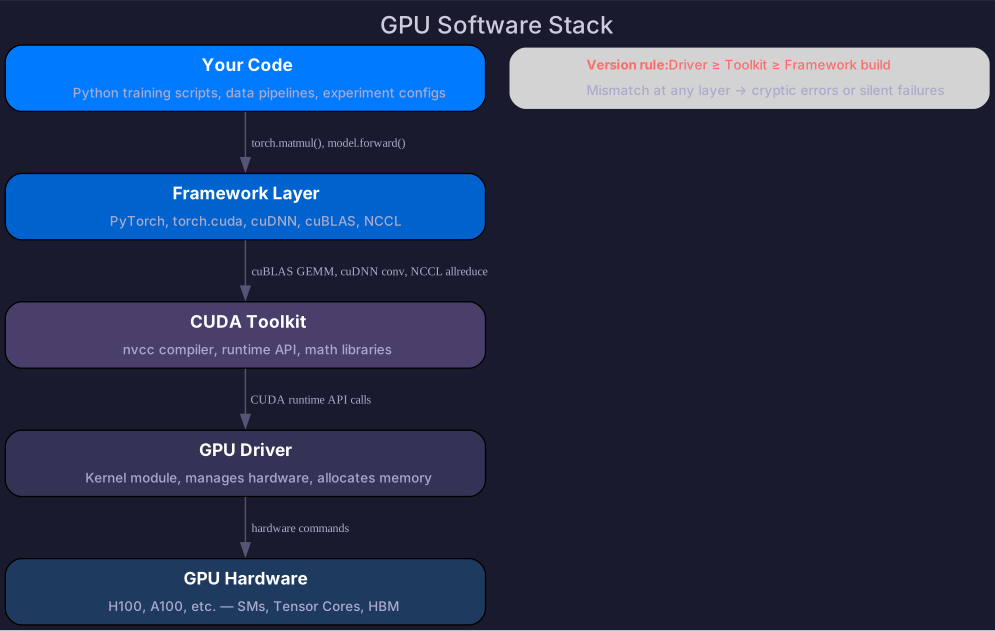
Four layers that are frequently confused:
Version Compatibility
| Component | Constraint |
|---|---|
| GPU driver | Must support your CUDA toolkit version (driver ≥ toolkit) |
| CUDA toolkit | Must match your PyTorch build (check pytorch.org install matrix) |
| cuDNN | Version must match CUDA toolkit |
| NCCL | Version must match across all nodes in distributed training |
Diagnostic Checklist
When things don’t work, check in this order:
# 1. Is the GPU visible?
nvidia-smi

# 2. Does CUDA work?
python -c "import torch; print(torch.cuda.is_available())"

# 3. Right CUDA version?
python -c "import torch; print(torch.version.cuda)"
nvcc --version

# 4. Can GPUs communicate? (for distributed)
# Run on all nodes — if it hangs, you have a network/NCCL issue
python -c "import torch.distributed as dist; dist.init_process_group('nccl')"
6. Containers for AI Workloads
Containers solve “works on my machine” — especially critical when the GPU software stack has strict version dependencies.
# Start from NVIDIA's base image (driver + CUDA + cuDNN)
FROM nvcr.io/nvidia/pytorch:24.01-py3

# Install additional dependencies
RUN pip install deepspeed flash-attn triton

# Copy training code
COPY . /workspace
WORKDIR /workspace

CMD ["torchrun", "--nproc_per_node=8", "train.py"]
Key points:
- Containers are NOT VMs — they share the host kernel. GPU access requires
--gpus allflag. - NVIDIA Container Toolkit maps
/dev/nvidia*devices into the container. - Driver stays on host — only CUDA toolkit/libraries are in the container.
- Docker images for AI are large (10-20 GB) — use registry caching.
Self-Check
- Explain why
b = afor a list creates a reference, not a copy - Explain the GIL and which concurrency model to use for data loading
- Read a C++ function signature with pointers and understand the memory layout
- Use
nvidia-smito check GPU utilization, memory, and topology - Set
CUDA_VISIBLE_DEVICESand distributed training environment variables - Explain the 4 layers of the GPU software stack and their version constraints
- Debug a “CUDA not available” error using the diagnostic checklist