Non-NVIDIA Accelerators Overview
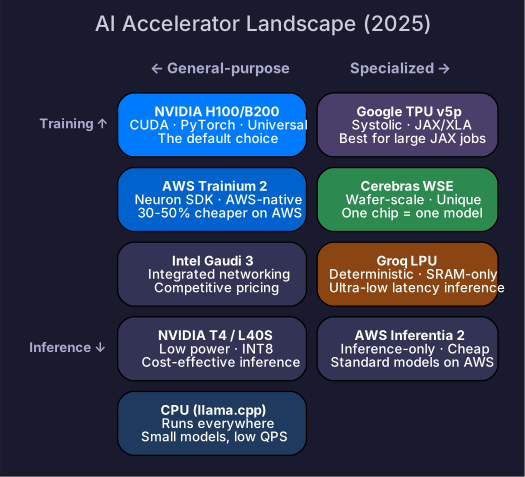
Google TPU, AWS Trainium, Intel Gaudi, Huawei Ascend, and CPU inference — the framework for evaluating alternatives to NVIDIA GPUs.
NVIDIA dominates AI compute today, but the landscape is diversifying. Understanding alternative accelerators helps you evaluate hardware options, avoid vendor lock-in, and understand why certain architectural choices exist. This chapter provides the analysis framework — not a detailed spec sheet for each chip.
1. Why Alternatives Matter
| Reason | Impact |
|---|---|
| Supply constraints | NVIDIA GPU demand exceeds supply; alternatives provide capacity |
| Cost | Competition drives down prices; some workloads are cheaper on alternatives |
| Specialization | Some chips are optimized for specific workloads (inference-only, training-only) |
| Sovereignty | Some regions/companies need non-US hardware options |
| Architecture diversity | Different designs reveal different tradeoffs — learning from them improves your understanding of GPU design choices |
2. Google TPU
Architecture
TPUs use a systolic array design — a 2D grid of processing elements where data flows through the grid, performing multiply-accumulate at each step. This is fundamentally different from NVIDIA’s SIMT model.
| Component | TPU | NVIDIA GPU |
|---|---|---|
| Compute unit | Systolic array (128×128 or 256×256) | Tensor Cores + CUDA Cores |
| Programming model | XLA (graph compilation) | CUDA (kernel-based) |
| Interconnect | ICI (Inter-Chip Interconnect) | NVLink |
| Memory | HBM | HBM |
| Software | JAX, TensorFlow | PyTorch, TensorFlow |
TPU Generations
| Generation | Year | BF16 TFLOPS | HBM | Notable |
|---|---|---|---|---|
| TPU v4 | 2022 | 275 | 32 GB HBM2e | 4096-chip pods |
| TPU v5e | 2023 | 197 | 16 GB HBM2e | Cost-optimized for inference |
| TPU v5p | 2024 | 459 | 95 GB HBM2e | Training-focused |
| TPU v6e (Trillium) | 2025 | 918 | 32 GB HBM | 4× v5e performance |
Strengths and Limitations
| Strengths | Limitations |
|---|---|
| Excellent for JAX/XLA workloads | Poor PyTorch support (improving but still friction) |
| Large-scale pods (4096+ chips) with fast ICI | Limited to Google Cloud |
| Cost-competitive for training at scale | Smaller ecosystem than CUDA |
| Optimized for Transformer workloads specifically | Custom ops require XLA-compatible implementations |
When to Use TPU
- Training large models if your team uses JAX
- Google Cloud-native workloads
- Cost-sensitive large-scale training (TPU pods can be cheaper than equivalent GPU clusters)
3. AWS Trainium / Inferentia
Architecture
AWS designed Trainium (training) and Inferentia (inference) as purpose-built AI chips with the Neuron SDK.
| Chip | Focus | Compute | Memory | Instance |
|---|---|---|---|---|
| Trainium 1 | Training | ~190 TFLOPS BF16 | 32 GB HBM2e | trn1 |
| Trainium 2 | Training | ~380 TFLOPS BF16 | 96 GB HBM2e | trn2 |
| Inferentia 2 | Inference | ~190 TFLOPS BF16 | 32 GB HBM2e | inf2 |
Strengths and Limitations
| Strengths | Limitations |
|---|---|
| Deeply integrated with AWS ecosystem | AWS-only |
| Competitive pricing (often 30-50% cheaper than P5 instances) | Neuron SDK is less mature than CUDA |
| NeuronLink for multi-chip communication | Not all model architectures supported |
| Growing PyTorch support via torch-neuronx | Custom kernel development is harder |
When to Use Trainium
- AWS-native workloads where cost matters
- Standard Transformer training (well-supported models)
- Teams willing to invest in Neuron SDK learning curve
4. Intel Gaudi
Architecture
Intel Gaudi uses a Matrix Math Engine (MME) for matrix operations and Tensor Processing Cores (TPC) for general compute, with integrated RoCE v2 networking on-chip.
| Chip | Compute | Memory | Notable |
|---|---|---|---|
| Gaudi 2 | ~430 TFLOPS BF16 | 96 GB HBM2e | Integrated 24× 100GbE RoCE |
| Gaudi 3 | ~900 TFLOPS BF16 | 128 GB HBM2e | FP8 support |
Strengths and Limitations
| Strengths | Limitations |
|---|---|
| Integrated networking (no separate NICs needed) | Smaller ecosystem |
| Competitive performance on supported models | Limited custom kernel tooling |
| PyTorch support via Habana SynapseAI SDK | Fewer reference implementations |
| Available on AWS (DL1 instances) | Smaller community |
5. Huawei Ascend
Architecture
Huawei’s Ascend processors use the Da Vinci architecture with the CANN (Compute Architecture for Neural Networks) software stack and MindSpore framework.
| Chip | Target | Compute | Memory |
|---|---|---|---|
| Ascend 910B | Training | ~320 TFLOPS BF16 | 64 GB HBM2e |
| Ascend 910C | Training | ~640 TFLOPS BF16 | 80 GB HBM2e |
Context
Ascend is primarily relevant in the Chinese market where US export restrictions limit access to NVIDIA’s latest GPUs. DeepSeek, Baidu, and other Chinese AI labs use Ascend alongside (or instead of) NVIDIA hardware.
5.5. Groq LPU
Groq’s Language Processing Unit (LPU) takes a radically different approach: deterministic execution with SRAM-only memory (no HBM). All model weights are stored in on-chip SRAM across many chips.
| Property | Groq LPU | NVIDIA GPU |
|---|---|---|
| Memory type | SRAM (on-chip, deterministic latency) | HBM (off-chip, variable latency) |
| Decode bottleneck | None (no HBM bandwidth wall) | Memory-BW-bound |
| Decode latency | Extremely low (~100-300 tok/s per user) | ~30-120 tok/s per user |
| Model loading | Entire model in SRAM across chip array | Weights in HBM |
| Flexibility | Inference-only, limited model sizes | Training + inference, any model |
Key insight: By eliminating HBM, Groq avoids the memory-bandwidth bottleneck that limits GPU decode. But it requires many chips (each with limited SRAM) to hold a large model.
When to use: Ultra-low-latency inference for supported model sizes.
5.6. Cerebras WSE
Cerebras takes the opposite extreme: one wafer = one chip. The Wafer-Scale Engine (WSE-3) is a single 46,225 mm² chip (vs ~814 mm² for H100) with:
- 900,000 AI cores
- 44 GB on-chip SRAM
- 21 PB/s memory bandwidth (on-chip)
Key insight: By keeping everything on one chip, Cerebras eliminates inter-chip communication — the bottleneck for distributed training. A single WSE can process models that would require dozens of GPUs.
Limitation: Maximum model size is limited by on-chip SRAM (44 GB). For larger models, Cerebras uses “weight streaming” from external memory, which partially negates the single-chip advantage.
6. CPU Inference
For certain workloads, CPUs are a viable — and cost-effective — alternative:
When CPUs Make Sense
| Scenario | Why CPU works |
|---|---|
| Small models (< 3B parameters) | Fits in DDR memory, quantized INT4 runs fast |
| Low QPS (< 10 requests/second) | Don’t need GPU throughput |
| No GPU available | Edge devices, laptops, some cloud instances |
| Batch embedding | CPU can handle bulk encoding with good throughput |
CPU Inference Engines
| Engine | Hardware | Key feature |
|---|---|---|
| llama.cpp | Any CPU (AVX2/AVX512, ARM NEON) | GGUF quantization, runs everywhere |
| Intel AMX | Sapphire Rapids+ Xeon | Hardware BF16/INT8 matrix acceleration |
| ARM SVE | Graviton, Apple Silicon | Scalable vector extension for matrix ops |
llama.cpp deserves special mention — it enables running 7B models on a laptop at ~10 tokens/second with INT4 quantization. This isn’t fast enough for production serving but is transformative for development, testing, and edge deployment.
7. Evaluation Framework
When comparing accelerators, look beyond headline TFLOPS:
| Dimension | What to evaluate | Why |
|---|---|---|
| Effective throughput | Tokens/second for YOUR model | TFLOPS ≠ real performance |
| Software maturity | Can you run your training code? | CUDA ecosystem is years ahead |
| Memory capacity | Does your model + KV cache fit? | The hard constraint |
| Memory bandwidth | Decode is memory-BW-bound | Often more important than compute |
| Interconnect | Multi-chip communication speed | Determines parallelism efficiency |
| Cost per token | $/token at production throughput | The ultimate metric |
| Availability | Can you actually get the hardware? | Supply constraints are real |
| Ecosystem | Libraries, tools, community | Debugging an unsupported model on new hardware is painful |
Rule of thumb: Unless you have a specific reason (cost, availability, cloud lock-in), NVIDIA GPUs with CUDA remain the default choice. The ecosystem advantage compounds — every new optimization (FlashAttention, vLLM, etc.) ships on CUDA first.
Self-Check
- Explain the fundamental architectural difference between TPU systolic arrays and GPU Tensor Cores
- Name a scenario where TPU is a better choice than NVIDIA GPU
- Explain why Trainium can be 30-50% cheaper than equivalent NVIDIA instances
- Explain when CPU inference is a viable option
- Name 4 dimensions to evaluate when comparing accelerators
- Explain why CUDA’s ecosystem advantage matters in practice