GPUDirect RDMA
Zero-copy GPU-to-GPU communication bypassing CPU — GPUDirect RDMA for networking, GPUDirect Storage for I/O, and when each is used.
In multi-node training, data must travel from GPU → CPU → NIC → network → NIC → CPU → GPU. GPUDirect RDMA eliminates the CPU from this path — GPU memory is read/written directly by the network card, cutting latency and CPU overhead.
1. The Data Path Problem
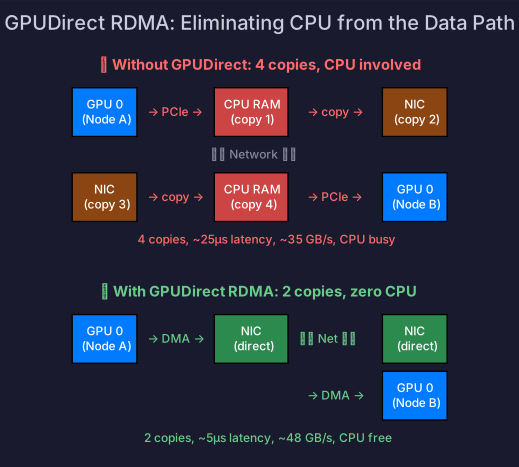
Without GPUDirect
GPU 0 (Node A)                    GPU 0 (Node B)
  ↓ PCIe copy to CPU              ↑ PCIe copy from CPU
CPU RAM (Node A)                  CPU RAM (Node B)
  ↓ Copy to NIC buffer            ↑ Copy from NIC buffer
NIC (Node A)  ───── Network ────→ NIC (Node B)
4 copies for one GPU-to-GPU transfer: GPU→CPU, CPU→NIC, NIC→CPU, CPU→GPU. Each copy adds latency and consumes CPU cycles.
With GPUDirect RDMA
GPU 0 (Node A)                    GPU 0 (Node B)
  ↓ Direct DMA to NIC             ↑ Direct DMA from NIC
NIC (Node A)  ───── Network ────→ NIC (Node B)
Zero CPU involvement — the NIC reads directly from GPU HBM (via PCIe BAR mapping) and writes directly to the remote GPU’s HBM.
2. GPUDirect Technologies
NVIDIA provides a family of GPUDirect technologies:
| Technology | What it does | Use case |
|---|---|---|
| GPUDirect P2P | GPU-to-GPU transfer within a node via NVLink/PCIe | Tensor parallelism, NVLink communication |
| GPUDirect RDMA | GPU-to-NIC direct access (bypass CPU) | Multi-node AllReduce, gradient sync |
| GPUDirect Storage (GDS) | GPU-to-NVMe/storage direct access (bypass CPU) | Checkpoint loading/saving, data loading |
| GPUDirect Async | GPU-initiated network operations | Overlapping compute and communication |
GPUDirect RDMA Requirements
- NVIDIA GPU with RDMA support (all data center GPUs)
- Mellanox/NVIDIA ConnectX NIC (ConnectX-5+)
- InfiniBand or RoCE v2 network
nvidia-peermemkernel module loaded- CUDA and MOFED (Mellanox OFED) drivers installed
# Check if GPUDirect RDMA is available
nvidia-smi topo -m  # shows P2P and RDMA status
lsmod | grep nvidia_peermem  # kernel module loaded?
3. GPUDirect Storage (GDS)
GDS extends the zero-copy principle to storage I/O:
Without GDS: NVMe → CPU RAM → GPU HBM  (bounce through CPU)
With GDS:    NVMe → GPU HBM            (direct, bypass CPU)
Impact on AI Workloads
| Workload | Without GDS | With GDS |
|---|---|---|
| Checkpoint loading (100 GB) | ~30s (CPU bottleneck) | ~10s (direct NVMe→GPU) |
| Checkpoint saving | ~30s | ~10s |
| Data loading (large datasets) | CPU-limited throughput | Higher throughput |
# cuFile API for GDS
import kvikio

# Direct GPU read from file (no CPU bounce)
f = kvikio.CuFile("/path/to/checkpoint.bin")
buf = torch.empty(size, device='cuda')
f.read(buf)  # NVMe → GPU directly
When GDS Matters
- Checkpoint save/load for large models (100+ GB)
- Streaming data from fast NVMe arrays
- NOT for typical training data loading (DataLoader already uses CPU efficiently)
4. Performance Impact
Multi-Node AllReduce
1 GB AllReduce across 2 nodes, InfiniBand NDR (400 Gb/s = 50 GB/s):
| Without GPUDirect | With GPUDirect RDMA | |
|---|---|---|
| Copies | 4 (GPU→CPU→NIC→NIC→CPU→GPU) | 2 (GPU→NIC→NIC→GPU) |
| Latency | ~25 μs | ~5 μs |
| Throughput | ~35 GB/s (CPU limited) | ~48 GB/s (near wire speed) |
| CPU utilization | High (memcpy) | Near zero |
37% higher throughput and 5× lower latency — significant for iterative gradient sync.
NCCL + GPUDirect
NCCL uses GPUDirect RDMA automatically when available:
# Verify NCCL is using GPUDirect
export NCCL_DEBUG=INFO
python train.py

# Look for: "NCCL INFO NET/IB : Using GPUDirect RDMA"
If GPUDirect is not available, NCCL falls back to CPU-staged transfers (slower but functional).
5. Network Topology Considerations
GPUDirect RDMA performance depends on PCIe topology — the GPU and NIC must be on the same PCIe switch for optimal performance:
Optimal: GPU ↔ PCIe Switch ↔ NIC  (same switch, ~48 GB/s)
Suboptimal: GPU ↔ PCIe Switch ↔ CPU ↔ PCIe Switch ↔ NIC  (cross-socket, ~25 GB/s)
# Check GPU-NIC affinity
nvidia-smi topo -m
# Look for "PIX" (same PCIe switch) vs "SYS" (cross-socket)DGX systems are designed with optimal GPU-NIC affinity — each GPU pair has a dedicated ConnectX NIC on the same PCIe switch.
Self-Check
- Draw the data path with and without GPUDirect RDMA
- Explain the difference between GPUDirect P2P, RDMA, and Storage
- Explain when GPUDirect Storage helps (checkpointing, not DataLoader)
- Verify GPUDirect RDMA availability using
nvidia-smi topoand NCCL logs - Explain why GPU-NIC PCIe affinity matters for GPUDirect performance