Engine Walkthrough: nano-vllm
Tracing a request through scheduler → model runner → attention backend → sampler to see how all inference engine pieces connect.
Understanding an inference engine requires seeing how all the pieces fit together. This chapter traces a single request through nano-vllm — a minimal (~2K line) implementation of vLLM’s core architecture — showing how scheduling, KV cache management, model execution, and sampling connect.
1. The Four-Layer Architecture
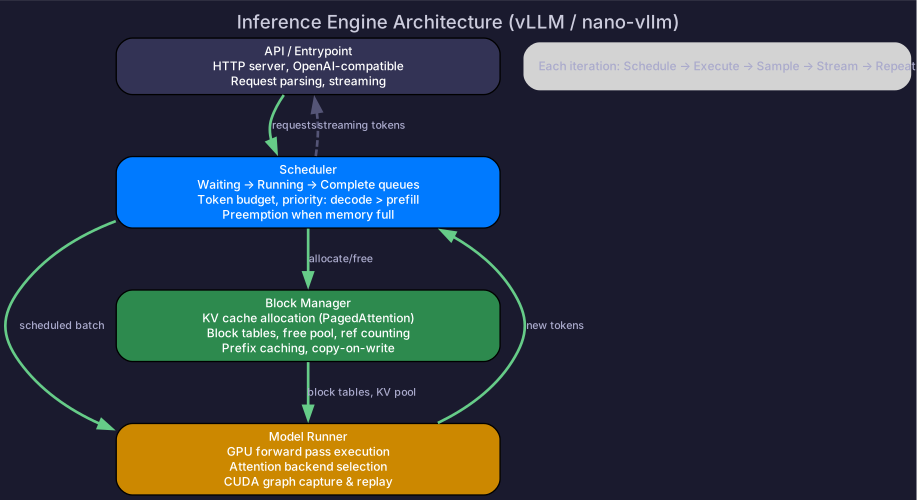
┌─────────────────────────────────────────────┐
│  Layer 1: API / Entrypoint                  │
│  (HTTP server, request parsing, streaming)  │
├─────────────────────────────────────────────┤
│  Layer 2: Scheduler                         │
│  (Request queues, token budget, preemption) │
├─────────────────────────────────────────────┤
│  Layer 3: Model Runner                      │
│  (GPU execution, attention backend, graphs) │
├─────────────────────────────────────────────┤
│  Layer 4: Block Manager                     │
│  (KV cache allocation, block tables, free pool) │
└─────────────────────────────────────────────┘
Each layer has a single responsibility and communicates through well-defined interfaces.
2. Request Lifecycle
Step 1: Request Arrives (API Layer)
# User sends: POST /v1/completions
# {"prompt": "What is PagedAttention?", "max_tokens": 200}

# API layer:
request = Request(
    prompt_tokens=tokenize("What is PagedAttention?"),  # [1, 1724, 374, ...]
    max_output_tokens=200,
    sampling_params=SamplingParams(temperature=0.7, top_p=0.9),
)
scheduler.add_request(request)  # → enters WAITING queue
Step 2: Scheduling (Scheduler)
# Every iteration, the scheduler decides what to run:
def schedule():
    batch = SchedulerOutput()
    budget = TOKEN_BUDGET  # e.g., 2048

    # Priority 1: running decode requests (1 token each)
    for req in RUNNING_QUEUE:
        batch.add_decode(req)
        budget -= 1

    # Priority 2: new requests get prefill chunks
    for req in WAITING_QUEUE:
        if budget <= 0:
            break
        chunk = min(req.remaining_prefill_tokens, budget)

        # Ask block manager: can we allocate KV blocks?
        if block_manager.can_allocate(req, chunk):
            block_manager.allocate(req, num_blocks_needed(chunk))
            batch.add_prefill(req, chunk)
            budget -= chunk

            if req.prefill_complete():
                RUNNING_QUEUE.add(req)  # promote to decode
            WAITING_QUEUE.remove(req)

    return batch
Step 3: GPU Execution (Model Runner)
def execute_model(batch: SchedulerOutput):
    # Prepare inputs
    input_ids = gather_input_ids(batch)    # [batch_size, 1] for decode
    positions = gather_positions(batch)     # position of each token
    block_tables = gather_block_tables(batch)  # KV cache mapping

    # Run model forward pass
    with torch.no_grad():
        # Embedding
        hidden = model.embed(input_ids)

        # Transformer layers
        for layer in model.layers:
            # Attention with PagedAttention kernel
            hidden = layer.attention(
                hidden, positions,
                kv_cache=kv_cache_pool,
                block_table=block_tables,
            )
            # FFN
            hidden = layer.ffn(hidden)

        # LM head → logits
        logits = model.lm_head(hidden)  # [batch_size, vocab_size]

    return logits
Step 4: Sampling (Sampler)
def sample(logits, sampling_params):
    for i, params in enumerate(sampling_params):
        if params.temperature == 0:
            # Greedy: pick highest probability token
            token = logits[i].argmax()
        else:
            # Temperature + top-p sampling
            probs = softmax(logits[i] / params.temperature)
            probs = top_p_filter(probs, params.top_p)
            token = torch.multinomial(probs, 1)

        # Append to request's output
        requests[i].output_tokens.append(token)

        # Check termination
        if token == EOS_TOKEN or len(requests[i].output_tokens) >= max_tokens:
            requests[i].mark_complete()

    return new_tokens
Step 5: Stream Response (API Layer)
# After each decode step, stream the new token:
for req in completed_this_step:
    send_token_to_client(req, new_token)

# When request is complete:
for req in fully_completed:
    send_finish_to_client(req)
    scheduler.free_request(req)     # release from running queue
    block_manager.free(req)          # return KV blocks to pool
3. Block Manager Details
The block manager is the memory allocator for KV cache:
class BlockManager:
    def __init__(self, num_gpu_blocks, block_size):
        self.free_blocks = list(range(num_gpu_blocks))
        self.block_tables = {}  # request_id → [physical_block_ids]

    def allocate(self, request, num_blocks):
        blocks = [self.free_blocks.pop() for _ in range(num_blocks)]
        self.block_tables[request.id] = blocks

    def free(self, request):
        blocks = self.block_tables.pop(request.id)
        self.free_blocks.extend(blocks)

    def can_allocate(self, request, tokens):
        blocks_needed = ceil(tokens / self.block_size)
        return len(self.free_blocks) >= blocks_needed
4. CUDA Graph Integration
For decode steps (fixed shape per batch size), CUDA graphs eliminate CPU overhead:
class ModelRunner:
    def __init__(self):
        self.cuda_graphs = {}  # batch_size → captured graph

    def execute(self, batch):
        bs = len(batch)
        if bs not in self.cuda_graphs:
            # First time: capture the graph
            self.cuda_graphs[bs] = capture_graph(self.model, bs)

        # Replay: copy inputs → replay graph → read outputs
        self.cuda_graphs[bs].input_buffer.copy_(input_ids)
        self.cuda_graphs[bs].replay()
        return self.cuda_graphs[bs].output_buffer
5. Putting It All Together
One complete iteration:
1. Scheduler: check completions, admit new requests, build batch
2. Block Manager: allocate/free KV blocks as needed
3. Model Runner: execute forward pass (CUDA graph for decode)
4. Sampler: select next tokens
5. API: stream tokens to clients
6. → repeat from step 1
Latency breakdown per decode step (70B, TP=8, batch=32, H100):
| Component | Time |
|---|---|
| Scheduler (CPU) | ~0.1 ms |
| CUDA graph launch | ~0.01 ms |
| GPU forward pass | ~5 ms |
| Sampling | ~0.05 ms |
| Streaming | ~0.02 ms |
| Total | ~5.2 ms per step |
Why ~5ms? Each H100 loads 17.5 GB weights (70B/8 GPUs) at 3,350 GB/s = 5.2ms. The step is memory-bandwidth-bound for batch sizes below ~295.
For the full nano-vllm source code and exercises, see the nano-vllm repository. For how each component works in detail: PagedAttention (block manager), Continuous Batching (scheduler), Attention Backends (CUDA graphs).
Self-Check
- Draw the four-layer architecture and name each layer’s responsibility
- Trace a request from arrival through prefill → decode → completion
- Explain how the scheduler prioritizes decode over prefill
- Describe the block manager’s allocate/free lifecycle
- Explain where CUDA graphs are used and why (decode only, not prefill)