Weight-Only Quantization
INT4/INT8 with GPTQ, AWQ, and Marlin — smaller model, faster memory reads, and why weight-only is ideal for decode-bound workloads.
Weight-only quantization (W4A16) compresses model weights to 4-bit while keeping activations in FP16/BF16. This is the most widely used quantization approach for LLM serving because it directly addresses the decode bottleneck — less weight data to load from HBM.
1. Why Weight-Only Works for Decode
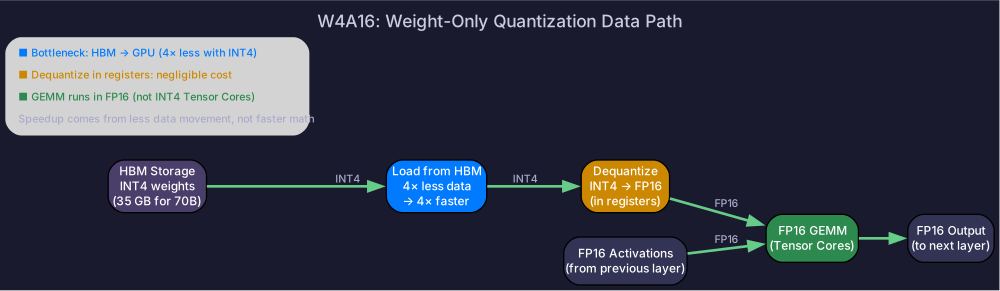
Recall from Prefill & Decode: decode is memory-bandwidth-bound. Each step loads the entire model’s weights to produce one token. Compressing weights from 16-bit to 4-bit reduces data movement by 4×:
| Precision | 70B model size | HBM read per decode step | Decode time (H100, single req) |
|---|---|---|---|
| BF16 | 140 GB | 140 GB | 42 ms |
| INT8 | 70 GB | 70 GB | 21 ms |
| INT4 | 35 GB | 35 GB | 10.5 ms |
4× smaller → 4× faster decode (when memory-bound). This is the single biggest speedup available for decode-heavy workloads.
W4A16 Computation
At inference, INT4 weights are dequantized to FP16 on-the-fly before the matrix multiply:
For each GEMM: W_fp16 = dequantize(W_int4, scale, zero_point)
               Y = X_fp16 @ W_fp16.T
The dequantization cost is small compared to the memory bandwidth saved — the bottleneck shifts from “loading weights” to “computing the GEMM.”
2. GPTQ: Optimal Brain Quantization
GPTQ adapts the Optimal Brain Surgeon framework to quantize weights one column at a time, compensating remaining weights for each quantization error:
How It Works
- Calibrate: Run a small dataset through the model, collect activation statistics per layer
- For each weight column (in order): a. Quantize the column to INT4 b. Compute the quantization error c. Distribute the error to not-yet-quantized columns using second-order (Hessian) information
- The compensation means later columns absorb earlier errors → lower total reconstruction error
Key Insight
GPTQ’s optimization target includes the input activations — it minimizes the output error rather than just . This means it preserves the weight directions that matter most for the actual data distribution.
# Quantize with GPTQ using AutoGPTQ
python -m auto_gptq.quantize \
    --model meta-llama/Llama-3.1-70B \
    --bits 4 \
    --group_size 128 \
    --calibration_dataset c4 \
    --num_samples 128
3. AWQ: Activation-Aware Weight Quantization
AWQ takes a different approach: instead of compensating errors post-quantization, it identifies and protects sensitive weight channels before quantizing.
How It Works
- Observe activations: Run calibration data, measure activation magnitude per channel
- Identify sensitive channels: Channels where activations are large → these weights matter most
- Scale sensitive weights up before quantization (and scale activations down equivalently)
- Quantize all weights to INT4
Key Insight
A weight channel’s importance isn’t determined by the weight magnitude — it’s determined by the activation magnitude flowing through it. A small weight multiplied by a large activation contributes more to the output than a large weight multiplied by a small activation.
GPTQ vs AWQ
| Dimension | GPTQ | AWQ |
|---|---|---|
| Approach | Quantize sequentially, compensate errors | Scale sensitive channels before quantizing |
| Calibration data use | Build reconstruction objective + Hessian | Measure activation statistics |
| Quality | Comparable | Comparable |
| Speed (quantization) | Slower (sequential, uses Hessian) | Faster (simpler optimization) |
| Inference speed | Same (depends on kernel, not algorithm) | Same |
In practice: both achieve similar quality. AWQ is faster to quantize; GPTQ can be slightly better on some models. Choose based on tooling convenience.
4. Marlin: High-Performance INT4 Kernel
GPTQ and AWQ produce the quantized weights, but the kernel determines inference speed. Marlin is an optimized CUDA kernel for INT4×FP16 GEMM:
- Dequantize-on-the-fly in registers (no separate dequantization pass)
- Fused dequantize + GEMM in one kernel launch
- Achieves near-ideal 4× speedup over FP16 for memory-bound decode
# vLLM automatically uses Marlin for GPTQ/AWQ models
from vllm import LLM
llm = LLM(
    model="TheBloke/Llama-2-70B-GPTQ",
    quantization="gptq_marlin",  # use Marlin kernel
)
5. Group Size and Quality
| Group size | Scales per layer | Metadata overhead | Quality |
|---|---|---|---|
| Per-tensor | 1 | Negligible | Worst |
| 128 (standard) | ~0.125 bits/weight | Good | |
| 64 | 2× more scales | ~0.25 bits/weight | Better |
| 32 | 4× more scales | ~0.5 bits/weight | Best |
Group size 128 is the default for both GPTQ and AWQ — it balances quality with metadata overhead and kernel efficiency.
6. When Weight-Only Isn’t Enough
| Scenario | Weight-only helps? | Better approach |
|---|---|---|
| Decode latency (single user) | ✅ Best | — |
| Decode throughput (many users) | ✅ Good | — |
| Prefill latency (long prompt) | ❌ Prefill is compute-bound | W8A8 (quantize both operands) |
| Quality-critical applications | ⚠️ 4-bit may degrade | W8A8 or FP8 (higher precision) |
For quantizing both weights and activations, see Weight-Activation Quantization.
Self-Check
- Explain why weight-only quantization speeds up decode (memory-bound → less data)
- Calculate the decode speedup from BF16 → INT4 on an H100
- Compare GPTQ vs AWQ: approach, calibration use, and practical differences
- Explain GPTQ’s error compensation: quantize column → distribute error to remaining
- Explain AWQ’s activation-aware scaling: why activation magnitude determines weight importance
- Explain Marlin’s dequantize-on-the-fly approach
- Choose group size for a given quality/overhead tradeoff