KV Cache
What it stores, how it grows with sequence length, per-token memory formula, GQA's impact, and why KV cache management is the #1 inference challenge.
The KV cache stores the key and value projections from every previous token at every layer. It is the single largest memory consumer in LLM inference and the reason most inference optimizations exist.
1. Why KV Cache Exists
The Cost of Not Caching
Without KV cache, generating token requires recomputing the K and V projections for all previous tokens:
- Generate token 1: compute K,V for 1 token → 1 forward pass
- Generate token 2: compute K,V for tokens 1-2 → full forward pass on 2 tokens
- Generate token 3: compute K,V for tokens 1-3 → full forward pass on 3 tokens
- …
- Generate token : full forward pass on tokens
Total work: token-forward-passes. For 1000 output tokens, that’s ~500,000 token computations — 500× more work than necessary.
With KV Cache: O(S) Instead of O(S²)
The KV cache stores each token’s K,V once and reuses them:
- Generate token 1: compute K₁,V₁ → save to cache
- Generate token 2: compute K₂,V₂ → save to cache, attend to {K₁,K₂},{V₁,V₂}
- Generate token : compute Kₜ,Vₜ → save, attend to all cached K,V
Each step only computes K,V for one new token. Total: single-token computations — linear, not quadratic.
The tradeoff: KV cache trades memory (storing all past K,V) for compute (avoiding recomputation). This is the fundamental tension in inference — memory limits how many requests you can serve, while caching makes each request fast.
2. What Gets Stored
During the attention computation for token :
The current token’s query attends to all previous keys and values.
The KV cache stores and tensors for all previous tokens across all layers:
Layer 0: K = [k₁, k₂, ..., k_t], V = [v₁, v₂, ..., v_t]
Layer 1: K = [k₁, k₂, ..., k_t], V = [v₁, v₂, ..., v_t]
...
Layer L: K = [k₁, k₂, ..., k_t], V = [v₁, v₂, ..., v_t]
Memory Layout
The KV cache tensor has shape:
# Standard (contiguous) layout:
kv_cache = torch.zeros(
    num_layers,      # L layers, each with independent KV
    2,               # K and V
    max_batch_size,  # one cache per request
    num_kv_heads,    # H_kv (8 for GQA, 64 for MHA)
    max_seq_len,     # grows as tokens are generated
    head_dim,        # typically 128
    dtype=torch.bfloat16,
)
# Shape: [L, 2, B, H_kv, S, d_h]

# PagedAttention layout (non-contiguous blocks):
kv_cache = torch.zeros(
    num_physical_blocks,  # total blocks in pool
    2,                    # K and V
    block_size,           # tokens per block (e.g., 16)
    num_kv_heads,
    head_dim,
    dtype=torch.bfloat16,
)
# Shape: [num_blocks, 2, block_size, H_kv, d_h]
# Block table maps: request → which blocks → where in this tensor
How GQA Reduces KV Cache Size
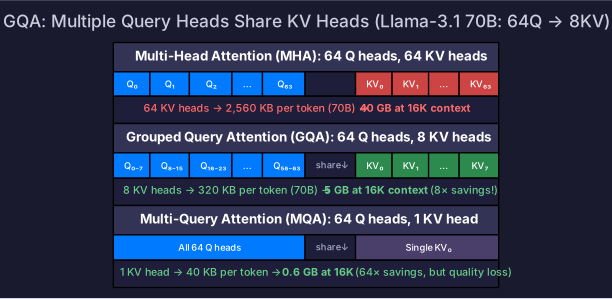
With Multi-Head Attention (MHA), every query head has its own K,V head:
- 64 query heads → 64 KV heads →
With Grouped Query Attention (GQA), multiple query heads share one K,V head:
- 64 query heads, 8 KV heads → → 8× less KV cache
- During attention: each KV head’s cached K,V is broadcast to its group of query heads
This is why Llama-3.1 uses GQA with 8 KV heads — it makes long-context serving feasible.
3. Memory Formula
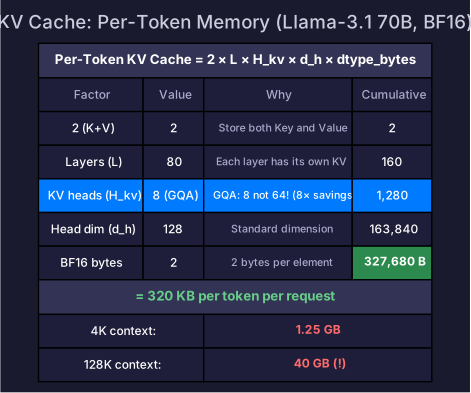
Per-Token KV Cache Size
Where:
- : one K tensor and one V tensor
- : number of Transformer layers
- : number of KV heads (not query heads — this is where GQA helps)
- : head dimension (typically 128)
- dtype_bytes: 2 for BF16/FP16, 1 for FP8/INT8
Per-Request KV Cache Size
Where is the current sequence length (prompt + generated tokens so far).
Worked Examples
| Model | L | H_kv | d_h | Bytes/token (BF16) | 4K context | 128K context |
|---|---|---|---|---|---|---|
| Llama-3.1 8B | 32 | 8 (GQA) | 128 | 128 KB | 0.5 GB | 16 GB |
| Llama-3.1 70B | 80 | 8 (GQA) | 128 | 320 KB | 1.25 GB | 40 GB |
| Llama-3.1 405B | 126 | 8 (GQA) | 128 | 504 KB | 2.0 GB | 63 GB |
| GPT-3 175B (MHA) | 96 | 96 (all heads) | 128 | 4,608 KB | 18 GB | 576 GB |
GQA is dramatic: Llama-3.1 70B with 8 KV heads uses 320 KB/token. If it used full MHA (64 KV heads), it would use 2,560 KB/token — 8× more. A standard MHA model with 32 heads like GPT-3 uses 4.5 MB/token — that’s 0.5 MB per token even at 32 layers (the number the AIInfraGuide uses: bytes MB). This is why modern models universally adopt GQA.
Total GPU Memory for Serving
Where is the number of concurrent requests. Example: Llama-3.1 70B on 80 GB GPU:
| Component | Memory |
|---|---|
| Weights (BF16) | 140 GB (needs TP=2 minimum) |
| Weights (INT4) | 35 GB |
| KV cache per request (4K context) | 1.25 GB |
| Available for KV (INT4 model, 80 GB GPU) | 45 GB |
| Max concurrent requests | ~36 |
At 128K context: 40 GB per request → only 1 request fits alongside INT4 weights!
4. KV Cache Growth Dynamics
During Prefill
All input tokens’ KV cache is computed at once. For a 4K token prompt on 70B: 1.25 GB allocated immediately.
During Decode
Each step adds one token’s KV: 320 KB for 70B. After 1000 decode steps: +320 MB additional.
Memory Timeline
Request start:    0 GB KV cache
After prefill:    1.25 GB (4K prompt)
After 1K decode:  1.6 GB
After 4K decode:  2.6 GB (8K total context)
After 124K decode: 40 GB (128K total context)
The KV cache grows linearly with context length. For long-context applications, KV cache — not model weights — becomes the dominant memory consumer.
5. KV Cache Lifecycle
Every request’s KV cache passes through four stages:
| Stage | When | What happens |
|---|---|---|
| Allocate | Request admitted by scheduler | Reserve KV blocks from free pool (PagedAttention: allocate first block) |
| Fill | Prefill: all at once. Decode: one token per step | Write K,V projections into cache. Cache grows each step. |
| Use | Every decode step | Attention kernel reads entire cached K,V to compute attention for new token |
| Release | Request completes (EOS or max length) | Return all blocks to free pool. Memory immediately available for new requests. |
Why this matters: The lifecycle determines when memory is consumed and freed. If requests have long outputs, memory is held for a long time. Continuous batching works because completed requests release immediately — their freed blocks are instantly available for newly admitted requests.
6. KV Cache and Batching
Each request in a batch has its own independent KV cache. KV is not shared between requests (unless prefix caching applies).
Batch of 3 concurrent requests (Llama-3.1 70B):
  Request A: KV cache at 2K tokens  → 0.63 GB
  Request B: KV cache at 4K tokens  → 1.25 GB
  Request C: KV cache at 500 tokens → 0.16 GB
  Total KV memory: 2.04 GB (all three combined)
Why Memory — Not Compute — Limits Concurrency
For decode, adding requests to a batch barely increases compute time (weights are loaded once and serve all requests — see Prefill & Decode). But each request needs its own KV cache:
The GPU has plenty of spare compute (decode is memory-bound at low batch sizes) but runs out of memory for KV caches. This is why KV cache management is the #1 inference bottleneck.
Variable-Length KV Caches
Unlike training (where sequences are padded to equal length), inference requests have wildly different KV cache sizes:
| Request | Context | KV cache (70B) |
|---|---|---|
| Short chatbot reply | 150 tokens | 47 MB |
| Document summarization | 8,200 tokens | 2.56 GB |
| Long code generation | 2,500 tokens | 781 MB |
This variability is why PagedAttention’s block-based allocation is essential — fixed pre-allocation wastes enormous memory on short requests.
7. The Fragmentation Problem
Naive Allocation
Pre-allocate maximum sequence length for each request:
Request A (max 4K): allocate 1.25 GB → actually uses 500 tokens (160 MB)
Request B (max 4K): allocate 1.25 GB → actually uses 3800 tokens (1.19 GB)
Request C (max 4K): allocate 1.25 GB → actually uses 200 tokens (63 MB)
Wasted memory: GB wasted out of 3.75 GB allocated — 62% waste.
Why It Matters
With 62% waste, your 36-concurrent-request GPU now supports only ~14 requests effectively. Throughput drops proportionally.
PagedAttention solves this by allocating KV cache in small pages (like OS virtual memory) instead of contiguous blocks — eliminating fragmentation and nearly doubling effective memory utilization.
For PagedAttention details, see PagedAttention.
8. Reducing KV Cache Memory
| Technique | Memory reduction | Quality impact | Article |
|---|---|---|---|
| GQA/MQA | 4-8× fewer KV heads | Negligible (designed in) | Attention Variants |
| KV cache quantization (FP8) | 2× | <1% quality loss | KV Cache Quantization |
| PagedAttention | ~0% waste (vs 60%+) | None | PagedAttention |
| Prefix caching | Share KV across requests | None (exact reuse) | Prefix Caching |
| Sliding window attention | Fixed-size cache | Some (loses distant context) | Architecture design |
| Token eviction | Drop low-attention tokens | Model-dependent | Research area |
Self-Check
- Explain why KV cache exists (O(S²) → O(S) speedup)
- Describe the four lifecycle stages (allocate → fill → use → release)
- Explain why each request needs its own KV cache (not shared)
- Explain why memory (not compute) limits inference concurrency
- Calculate per-token KV cache size for a given model architecture
- Calculate max concurrent requests for a given GPU memory and model
- Explain why GQA reduces KV cache by 4-8× compared to MHA
- Calculate KV cache memory waste with naive contiguous allocation
- Explain why long-context applications are KV-cache-limited, not weight-limited
- List techniques to reduce KV cache memory and their tradeoffs