⚡ Inference Systems· 10 min read
Quantization Selection Guide
Decision tree: hardware generation × quality requirement × workload type → recommended quantization format and toolchain.
quantizationselectiondecision-treevllmdeploymentpractical
With many quantization options available, choosing the right one requires matching your hardware, quality requirements, and workload characteristics. This chapter provides a systematic decision framework.
1. Start from the Bottleneck
The first question isn’t “which quantization?” — it’s “what’s limiting my throughput?”
| Primary bottleneck | Symptom | Quantization target |
|---|---|---|
| Weight loading (decode, small batch) | TPOT high, GPU compute underutilized | Weight-only: GPTQ/AWQ INT4 |
| KV cache memory (many requests, long context) | Max concurrent requests too low | KV cache: FP8 or INT4 |
| GEMM compute (prefill, large batch) | TTFT high, GPU fully utilized | W8A8: SmoothQuant or FP8 |
| Model doesn’t fit on GPU | OOM at load time | Weight: INT4 (35 GB for 70B vs 140 GB BF16) |
2. Decision Tree
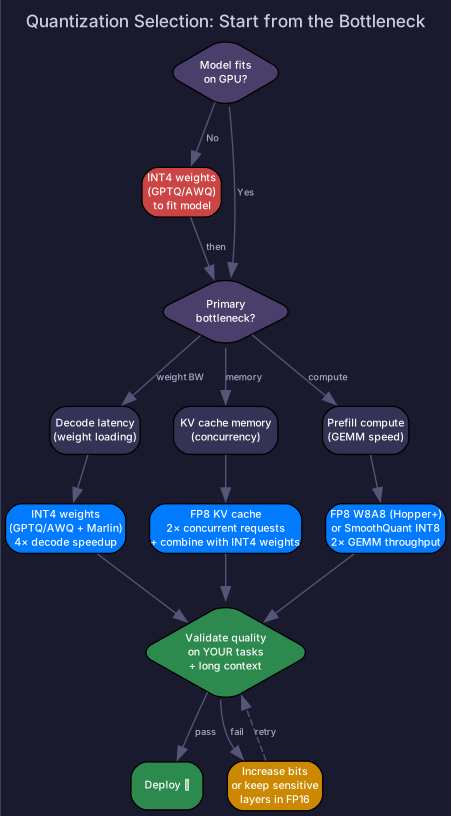
1. Does the model fit on your GPU(s) in BF16?
   │
   ├── NO → Use INT4 (GPTQ/AWQ) to fit. Consider TP if INT4 still doesn't fit.
   │
   └── YES → What's the primary bottleneck?
       │
       ├── DECODE LATENCY → INT4 weight-only (GPTQ/AWQ + Marlin)
       │                     4× less weight loading, biggest decode speedup
       │
       ├── KV CACHE MEMORY → FP8 KV cache (2× more concurrent requests)
       │                      Combine with INT4 weights for maximum effect
       │
       ├── PREFILL COMPUTE → FP8 W8A8 (Hopper+) or INT8 SmoothQuant
       │                      2× GEMM throughput from low-precision Tensor Cores
       │
       └── ALL OF THE ABOVE → INT4 weights + FP8 KV + evaluate FP8 compute
3. Hardware-Specific Recommendations
| Hardware | Weight quant | Activation quant | KV cache | Notes |
|---|---|---|---|---|
| A100 | GPTQ/AWQ INT4 | SmoothQuant INT8 | BF16 or INT8 | No native FP8 |
| L40S / 4090 | GPTQ/AWQ INT4 | SmoothQuant INT8 | BF16 | Consumer-friendly |
| H100 / H200 | FP8 or INT4 | FP8 native | FP8 | Simplest: all FP8 |
| B200 | NVFP4 or INT4 | FP8 or FP4 | FP8 or FP4 | Next-gen, evaluate FP4 |
The H100 Sweet Spot
On Hopper, the simplest high-performance configuration:
# All-FP8 on H100: simple, fast, good quality
llm = LLM(
    model="meta-llama/Llama-3.1-70B",
    quantization="fp8",              # FP8 weights + activations
    kv_cache_dtype="fp8_e4m3",       # FP8 KV cache
    tensor_parallel_size=4,
)
For maximum decode speed (at slight quality cost):
# INT4 weights + FP8 KV for maximum throughput
llm = LLM(
    model="TheBloke/Llama-3.1-70B-AWQ",  # INT4 weights
    quantization="awq_marlin",             # Marlin kernel for fast dequant
    kv_cache_dtype="fp8_e4m3",             # FP8 KV cache
    tensor_parallel_size=2,                # fits on fewer GPUs!
)
4. Quality Validation Checklist
Quantization always needs quality verification. Don’t trust benchmarks from other models/datasets.
| Step | What to do | Why |
|---|---|---|
| 1. Baseline | Measure BF16 quality on YOUR tasks | Need a comparison point |
| 2. Quantize | Apply chosen method | — |
| 3. Automated eval | Run standard benchmarks (MMLU, HumanEval, etc.) | Catch gross quality loss |
| 4. Task-specific eval | Run on YOUR production workload | Standard benchmarks may not catch domain-specific issues |
| 5. Long-context eval | Test with longest expected context | KV quantization errors accumulate |
| 6. Latency/throughput | Benchmark under realistic load | Confirm the speedup is real |
Quality Gates
| Quality metric | INT4 weight-only | FP8 W8A8 | INT4 KV | Action if fails |
|---|---|---|---|---|
| MMLU drop | <1% | <0.5% | <1% | Increase bit width or keep sensitive layers in FP16 |
| Perplexity increase | <0.1 | <0.05 | <0.2 | Recalibrate with better data |
| Task-specific regression | <2% relative | <1% | <3% | Keep offending layers unquantized |
| Long-context recall (128K) | N/A | N/A | <5% drop | Use FP8 instead of INT4 for KV |
5. Common Pitfalls
| Pitfall | What happens | Fix |
|---|---|---|
| Quantizing without benchmarking | Ship degraded quality to production | Always validate on your tasks |
| Using INT4 for prefill-heavy workloads | No prefill speedup (W4A16 computes in FP16) | Use W8A8 for prefill |
| FP8 on Ampere/Ada | Falls back to FP16, no speedup | Use INT8 SmoothQuant instead |
| Ignoring long-context quality | Short prompts pass, 32K+ prompts fail | Always test at max context |
| Group size too large | Poor quality at 4-bit | Reduce from 128 to 64 |
Self-Check
- Identify the primary bottleneck for a given workload and choose the quantization target
- Walk through the decision tree for: 70B on 2×H100, chatbot with 4K context
- Choose the right quantization for A100 vs H100 vs B200
- Configure vLLM for all-FP8 and for INT4+FP8 KV
- Design a quality validation pipeline for a quantized model