KV Cache Quantization
FP8/INT8 KV cache — doubling concurrent sequences at minimal quality cost, KIVI's asymmetric strategy, and why KV quantization differs from weight quantization.
KV cache is the largest memory consumer during inference. Quantizing it from BF16 to FP8 or INT4 can double the number of concurrent requests — directly increasing throughput — with minimal quality degradation.
1. The Memory Savings
| KV precision | Bytes/element | 70B KV per token | 4K context | Max requests (45 GB available) |
|---|---|---|---|---|
| BF16 | 2 | 320 KB | 1.25 GB | 36 |
| FP8 | 1 | 160 KB | 0.63 GB | 71 |
| INT4 | 0.5 | 80 KB | 0.31 GB | 145 |
FP8 KV doubles concurrent requests. INT4 quadruples them — but quality degrades, especially for long contexts.
2. Why KV Cache Quantization Is Different from Weights
| Weight quantization | KV cache quantization | |
|---|---|---|
| When | Offline, once (PTQ) | Online, every decode step |
| Data lifetime | Fixed forever | Created and consumed during request |
| Calibration | Run calibration dataset | Must use runtime statistics (no offline calibration) |
| Error propagation | Through one GEMM | Through attention: Key errors change which tokens the model attends to; Value errors change what information is retrieved |
| Validation | Standard benchmarks | Must test on long-context tasks — short prompts may hide errors |
Key vs Value errors propagate differently: Key errors alter the attention distribution (which tokens are attended to). Value errors alter the attended content. Both matter, but Key errors can be more catastrophic — attending to the wrong token is worse than slightly distorting the right token.
3. KIVI: Asymmetric Key/Value Quantization
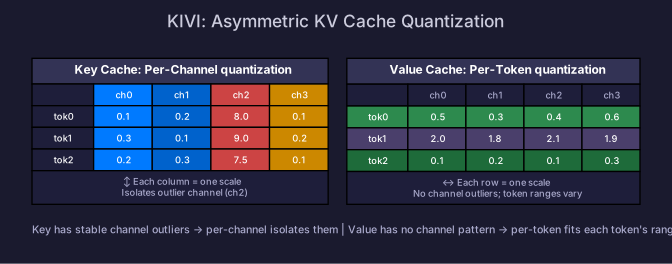
KIVI (2024) discovered that Keys and Values have different statistical properties and should be quantized along different axes:
Key: Per-Channel Quantization
Keys have stable outlier channels — the same feature dimensions are consistently large across tokens. Per-channel quantization isolates these outliers:
Key matrix (rows=tokens, cols=channels):
  Token 1: [0.1,  0.2,  8.0,  0.1]    ← channel 3 is always large
  Token 2: [0.3,  0.1,  9.0,  0.2]
  Token 3: [0.2,  0.3,  7.5,  0.1]

Per-channel: quantize each column separately
  Channel 3 gets its own scale (s=9.0/127) — doesn't affect other channels
Value: Per-Token Quantization
Values do not have stable channel outliers. Instead, different tokens have different magnitude ranges. Per-token quantization fits each token’s KV independently:
Value matrix (rows=tokens, cols=channels):
  Token 1: [0.5,  0.3,  0.4,  0.6]    ← uniform range
  Token 2: [2.0,  1.8,  2.1,  1.9]    ← different range, but no channel outlier
  Token 3: [0.1,  0.2,  0.1,  0.3]

Per-token: quantize each row separately
  Each token gets its own scale — handles varying ranges
Residual Cache for Streaming
When new tokens arrive, they may not fill a complete quantization group. KIVI keeps a small residual cache in full precision for recent tokens, quantizing them in batches once enough accumulate:
Quantized KV: [tokens 1-64 in INT4] + [tokens 65-128 in INT4] + ...
Residual:     [tokens 193-200 in BF16] (not yet enough for a full group)
4. FP8 KV Cache (Simplest Approach)
For Hopper+ GPUs, FP8 KV is the simplest and most practical approach:
# vLLM with FP8 KV cache
from vllm import LLM
llm = LLM(
    model="meta-llama/Llama-3.1-70B",
    kv_cache_dtype="fp8_e4m3",  # FP8 KV cache
)
Per-tensor or per-token scaling: Each KV tensor gets a scale computed from its maximum absolute value. The scale is stored alongside the quantized data (negligible overhead).
Quality Impact
| KV precision | MMLU (70B) | Long-context recall (128K) | Notes |
|---|---|---|---|
| BF16 (baseline) | 79.2% | 95% | Full precision |
| FP8 | 79.0% | 93% | <1% loss — recommended |
| INT4 (KIVI) | 78.5% | 88% | Noticeable on long context |
| INT2 (KIVI) | 77.0% | 75% | Significant degradation |
Always validate on long-context tasks. Short conversations (1-2K tokens) may show no quality difference at INT4, but 32K+ context retrieval tasks reveal the accumulated error.
5. Combining with Weight Quantization
KV cache quantization is orthogonal to weight quantization — you can (and should) use both:
| Configuration | Weights | KV cache | Effect |
|---|---|---|---|
| Baseline | BF16 (140 GB) | BF16 | 36 concurrent requests |
| Weight-only | INT4 (35 GB) | BF16 | 36 requests (weights smaller, same KV) |
| KV-only | BF16 (140 GB) | FP8 | 71 requests (but weights too big for 1 GPU) |
| Both | INT4 (35 GB) | FP8 | ~71 requests (best of both) |
Self-Check
- Calculate the concurrent request increase from BF16 → FP8 KV cache
- Explain why KV cache quantization differs from weight quantization (online vs offline, error propagation)
- Explain KIVI’s asymmetric strategy: Key per-channel, Value per-token
- Explain the residual cache concept for streaming quantization
- Explain why long-context validation is essential for KV quantization
- Configure vLLM for FP8 KV cache