Weight-Activation Quantization
W8A8 with SmoothQuant and FP8 on Hopper+ — quantizing both operands for faster Tensor Core math, and the smoothing trick that makes it work.
Weight-activation quantization (W8A8) quantizes both weight and activation operands of matrix multiplications. This enables low-precision Tensor Core execution — speeding up not just decode but also the compute-bound prefill phase.
1. Why Quantize Activations Too?
Weight-only (W4A16) helps decode by reducing memory reads. But the GEMM itself still runs in FP16 — only one operand is lower precision. W8A8 makes both operands INT8 or FP8, enabling the GPU’s INT8/FP8 Tensor Cores:
| Configuration | GEMM precision | H100 TFLOPS | Speeds up |
|---|---|---|---|
| W16A16 (BF16) | BF16 × BF16 | 989 | Baseline |
| W4A16 | INT4 → dequant to FP16, then FP16 × FP16 | 989 | Decode only (less memory) |
| W8A8 (INT8) | INT8 × INT8 | 1,979 | Both prefill and decode |
| W8A8 (FP8) | FP8 × FP8 | 1,979 | Both prefill and decode |
W8A8 doubles the effective compute throughput by using INT8/FP8 Tensor Cores.
2. The Problem: Activation Outliers
Weights are well-behaved — roughly Gaussian, easy to quantize. Activations are not. Transformer activations have outlier channels — a few feature dimensions with values 10-100× larger than others:
Activation row (one token): [0.1, 0.2, 80.0, 0.3, 0.1, 75.0, 0.2, 0.1]
                                         ↑ outlier           ↑ outlier
With per-tensor INT8 quantization, the scale is set by the outlier: . All small values map to 0 or 1 — information destroyed.
3. SmoothQuant: The Smoothing Trick
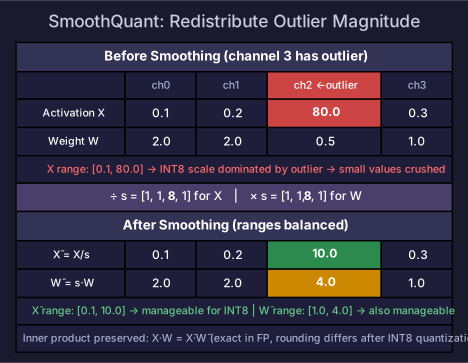
SmoothQuant’s key insight: mathematically equivalent transformation that moves outlier magnitude from activations to weights.
For a linear layer , introduce a per-channel diagonal scaling matrix :
- Divide each activation channel by → shrinks outlier activations
- Multiply corresponding weight channel by → enlarges weights to compensate
- The product is mathematically identical to
Before smoothing:
  Activation channel 3: [0.1, 0.2, 80.0]  (outlier!)
  Weight channel 3:     [2.0, 2.0, 0.5]

Smooth with s₃ = 8:
  Activation channel 3: [0.1, 0.2, 80.0] / 8 = [0.0125, 0.025, 10.0]  (smaller range!)
  Weight channel 3:     [2.0, 2.0, 0.5] × 8 = [16.0, 16.0, 4.0]

Inner product preserved: 0.1×2 + 0.2×2 + 80.0×0.5 = 40.6
                         0.0125×16 + 0.025×16 + 10.0×4 = 40.6  ✅
After smoothing, both and have moderate ranges — but they are still floating-point numbers. The actual INT8 quantization happens after smoothing:
Step 1: SmoothQuant transform (offline, during model preparation)
  X_tilde = X @ diag(1/s)     → still floating-point, no quantization yet
  W_tilde = diag(s) @ W       → still floating-point

Step 2: INT8 quantization (at inference time)
  X_int8 = quantize(X_tilde)  → now INT8, with rounding error
  W_int8 = quantize(W_tilde)  → INT8
  Y = dequantize(X_int8 @ W_int8)  → INT8 Tensor Core GEMM
Key distinction: SmoothQuant does NOT produce quantized values. It produces floating-point values with better-behaved ranges. The subsequent quantization introduces rounding errors — but because the ranges are now moderate, those errors are much smaller.
Choosing the Smoothing Factor
Where controls how much difficulty shifts from activations to weights. is the default — split the difficulty evenly.
4. FP8 W8A8 (Native on Hopper+)
H100 and newer GPUs have native FP8 Tensor Cores — no SmoothQuant needed for basic FP8 W8A8:
| Format | Used for | Why |
|---|---|---|
| E4M3 | Weights, forward activations | More precision (3 mantissa bits) |
| E5M2 | Backward gradients | More range (5 exponent bits) |
Per-Tensor Scaling for FP8
FP8 still needs scaling to fit data into the limited range ( for E4M3):
Where (for E4M3).
FP8 vs INT8 SmoothQuant
| INT8 SmoothQuant | FP8 native | |
|---|---|---|
| Preprocessing | SmoothQuant offline transform | Per-tensor scaling (online) |
| Calibration | Required (for smoothing factors) | Optional (delayed scaling uses previous step’s max) |
| Kernel support | Specialized INT8 GEMM | Native Tensor Core (simpler) |
| Quality | Good with proper smoothing | Good (FP8 has more dynamic range than INT8) |
| Hardware | Any GPU with INT8 Tensor Cores | H100+ (Hopper, Blackwell) |
On Hopper+, FP8 is generally preferred — simpler pipeline, no preprocessing, native hardware support.
5. Practical Configuration
# vLLM with FP8 (Hopper+)
from vllm import LLM
llm = LLM(
    model="meta-llama/Llama-3.1-70B",
    quantization="fp8",   # native FP8 W8A8
)

# vLLM with SmoothQuant INT8
llm = LLM(
    model="path/to/smoothquant-model",
    quantization="smoothquant",
)
6. When to Use W8A8
| Scenario | Recommendation |
|---|---|
| Prefill-heavy workload (long prompts) | ✅ W8A8 speeds up compute-bound prefill |
| Quality-sensitive (medical, legal) | ✅ 8-bit has minimal quality loss |
| H100+ available | ✅ Native FP8, simplest pipeline |
| Decode-only optimization needed | W4A16 gives more decode speedup (4× vs 2× bandwidth reduction) |
| Maximum throughput | Combine: W4A16 weights + FP8 KV cache |
For KV cache quantization, see KV Cache Quantization. For lower-bit formats, see Emerging Formats.
Self-Check
- Explain why W8A8 speeds up both prefill and decode (INT8/FP8 Tensor Cores)
- Explain the activation outlier problem and why naive INT8 quantization fails
- Derive SmoothQuant’s mathematical equivalence:
- Calculate the smoothed activation and verify the inner product is preserved
- Compare FP8 native vs INT8 SmoothQuant on Hopper GPUs
- Choose between W4A16 and W8A8 for a given workload